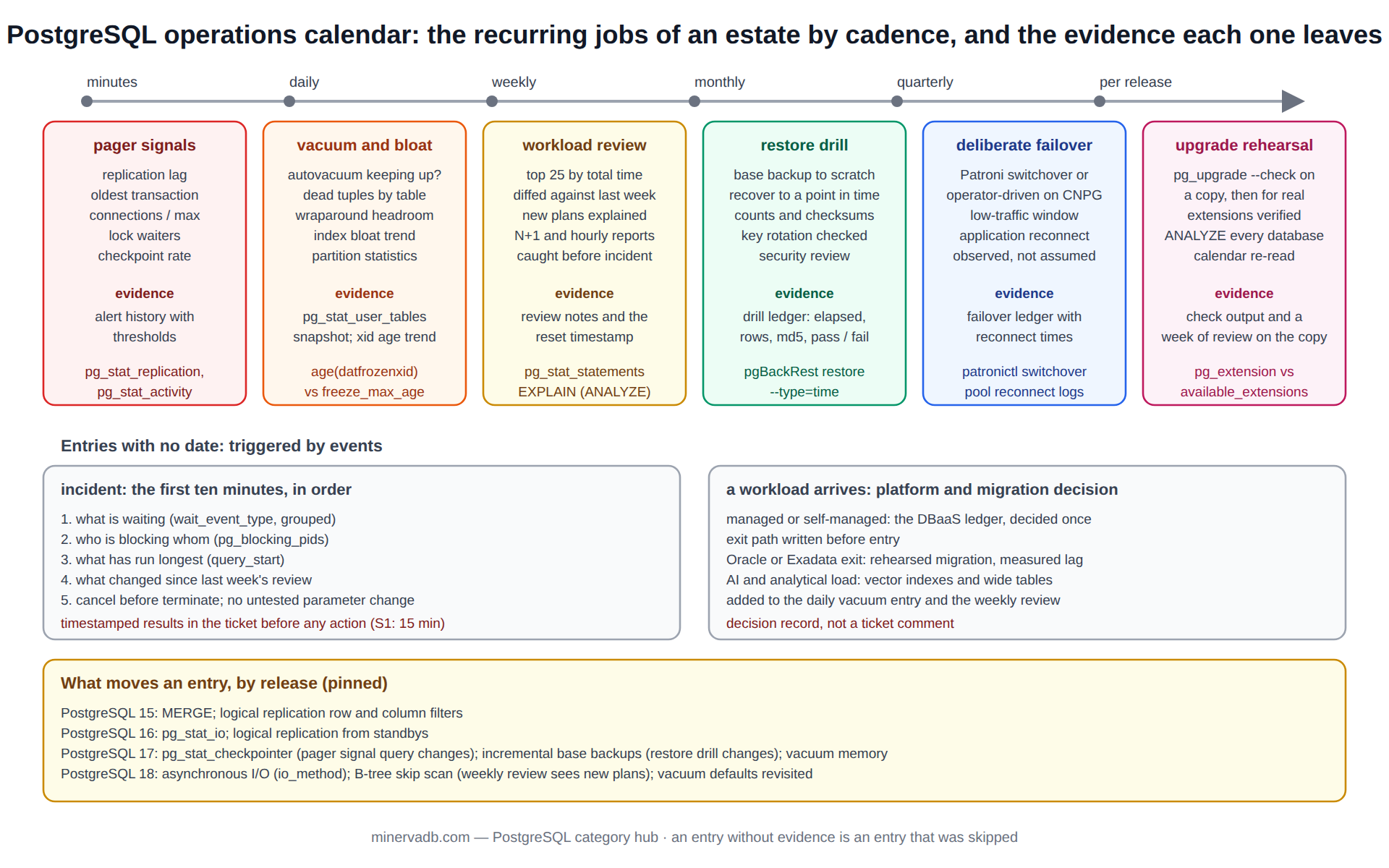
PostgreSQL operations are not a tuning exercise; they are a cadence. The same small set of jobs has to happen every hour, every day, every week, every quarter and at every major release, and an estate where those cadences are kept is one where the incidents are rare and short. This page is the PostgreSQL operations calendar as MinervaDB runs it for managed and supported customers, with the catalog query behind each entry and the archive posts that go deeper.
It is the front door to the largest archive on this site and the one that covers PostgreSQL operations end to end, close to 400 posts, and it is deliberately organised by when a task is done rather than by what the task is, because that is how the work actually arrives. The sub-archives are organised by topic; this page tells the operator what to open on a Monday morning, during an incident, and the week before an upgrade.
The PostgreSQL operations calendar assumes PostgreSQL 15 or later on self-managed or managed infrastructure, and calls out where a managed service changes an entry.
PostgreSQL operations every few minutes: the signals that page someone
Five numbers are worth an alert in any PostgreSQL operations setup, and each is a single query against a system view. Replication lag, because a replica that is far behind is a failover that loses data. Oldest transaction age, because a transaction open for hours blocks vacuum from removing anything newer and starts the countdown to wraparound. Connection count against max_connections, because the last ten connections are the ones the incident responder needs. Lock waits over a threshold, and checkpoint frequency, because a checkpoint every thirty seconds is the redo volume telling you max_wal_size is too small.
-- the five pager signals on one screen
SELECT
  (SELECT coalesce(max(extract(epoch FROM replay_lag)), 0)  FROM pg_stat_replication)              AS max_replay_lag_s,
  (SELECT coalesce(max(extract(epoch FROM now() - xact_start)), 0)
     FROM pg_stat_activity WHERE state != 'idle' AND backend_type = 'client backend')                AS oldest_xact_s,
  (SELECT count(*) FROM pg_stat_activity)                                                            AS connections,
  (SELECT setting::int FROM pg_settings WHERE name = 'max_connections')                            AS max_connections,
  (SELECT count(*) FROM pg_stat_activity WHERE wait_event_type = 'Lock')                            AS lock_waiters,
  (SELECT num_timed + num_requested FROM pg_stat_checkpointer)                                       AS checkpoints_total;   -- PostgreSQL 17+; pg_stat_bgwriter before
The archive posts behind these are PostgreSQL replication lag, lock contention with pg_locks, PostgreSQL wait events, and checkpoint tuning for I/O spikes and recovery. Connection pressure has its own pair, PgBouncer connection pooling and PgBouncer tuning for pool saturation, because on a busy PostgreSQL the pool is where connection incidents are actually decided.
Daily PostgreSQL operations: vacuum, bloat and the wraparound clock
Autovacuum is the daily job that PostgreSQL runs for you, and the daily PostgreSQL operations check is whether it is keeping up. The three views that answer that are pg_stat_user_tables for dead tuples and last-vacuum times, pg_stat_progress_vacuum for what is running now, and the database-level age(datfrozenxid) for how far each database is from the wraparound limit.
-- tables autovacuum is losing on: dead tuples above threshold with no recent vacuum
SELECT relname,
       n_dead_tup,
       n_live_tup,
       round(100.0 * n_dead_tup / greatest(n_live_tup + n_dead_tup, 1), 1) AS pct_dead,
       last_autovacuum
FROM   pg_stat_user_tables
WHERE  n_dead_tup > 10000
ORDER  BY n_dead_tup DESC
LIMIT  20;

-- wraparound headroom per database: alert well before autovacuum_freeze_max_age (default 200M)
SELECT datname, age(datfrozenxid) AS xid_age,
       round(100.0 * age(datfrozenxid) / current_setting('autovacuum_freeze_max_age')::bigint, 1) AS pct_of_limit
FROM   pg_database
ORDER  BY xid_age DESC;
The vacuum thread of the archive is deep because it is where most PostgreSQL estates are quietly losing: autovacuum tuning, autovacuum tuning, second edition, PostgreSQL 18 vacuum tuning for the release that changed the defaults, and partitioned table statistics for the case where the parent’s statistics are never refreshed because autovacuum works on partitions. Index bloat is the same problem one level down; index bloat with REINDEX CONCURRENTLY and should I rebuild my index cover it, and the PostgreSQL index archive holds the full checklist.
Weekly PostgreSQL operations: the workload review
Once a week, the top of pg_stat_statements by total time is read by a person, compared with the previous week, and the differences explained. This is the single highest-value hour in PostgreSQL operations, because a plan regression, a new N+1 pattern from an application release, or a report that started running hourly all show up here a week before they become an incident.
-- weekly review: the workload by total time, with the shape that makes regressions visible
SELECT queryid,
       calls,
       round(total_exec_time::numeric / 1000, 1)   AS total_s,
       round(mean_exec_time::numeric, 2)           AS mean_ms,
       round(stddev_exec_time::numeric, 2)         AS stddev_ms,
       rows,
       shared_blks_read,
       left(regexp_replace(query, '\s+', ' ', 'g'), 90) AS query
FROM   pg_stat_statements
ORDER  BY total_exec_time DESC
LIMIT  25;

-- reset after the review so next week's numbers are next week's
SELECT pg_stat_statements_reset();
The reading guide is troubleshooting slow PostgreSQL queries with EXPLAIN ANALYZE and pg_stat_statements, and the release-specific tuning is in optimizing SQLs in PostgreSQL 18.4, PostgreSQL 18 performance internals and the PostgreSQL 18 performance configuration matrix. For a cross-engine view of the same review, Redis 8.8 and distributed PostgreSQL query performance covers the case where the slow PostgreSQL query is really a cache-miss pattern upstream.
The weekly review is where observability tooling earns its cost: Datadog PostgreSQL observability covers the integration, AI-driven PostgreSQL anomaly detection covers automating the “what changed since last week” question, and cost-aware monitoring keeps the telemetry bill from exceeding the database bill.
Monthly PostgreSQL operations: backups that have been restored, HA that has failed over
A backup that has not been restored is a hypothesis, and PostgreSQL operations that rely on one are a bet. Once a month, a base backup is restored to a scratch host, recovered to a point in time, and checked with a row count and a checksum against the primary, with the elapsed time written down as the measured recovery time objective. Once a quarter, the HA cluster is failed over deliberately during a low-traffic window and the application’s reconnect behaviour is observed.
# monthly restore drill with pgBackRest; every step timed, result written to the drill ledger
pgbackrest --stanza=main --type=time --target="2026-09-20 03:00:00+00" \
           --target-action=promote --pg1-path=/var/lib/postgresql/scratch restore
pg_ctl -D /var/lib/postgresql/scratch start

# validation against the primary: same counts, same checksum on a sample of tables
psql -h scratch -c "SELECT count(*), md5(string_agg(id::text, ',' ORDER BY id)) FROM orders WHERE created_at < '2026-09-20 03:00:00+00';"
psql -h primary -c "SELECT count(*), md5(string_agg(id::text, ',' ORDER BY id)) FROM orders WHERE created_at < '2026-09-20 03:00:00+00';"
The planning behind the drill is in planning strategies for PostgreSQL RPO and RTO, and the HA topologies it exercises are in Patroni standby clusters and PostgreSQL replication and CloudNativePG on Kubernetes, where the operator runs the failover and the drill is about the application, not the database. key management in PostgreSQL encryption belongs in the monthly slot too: a restore drill that cannot decrypt the backup is a failed drill, and key rotation is the step that breaks it.
Security review shares the month. The BYOC database security standard sets out the controls, and the PostgreSQL security archive holds the role, row-level security and audit posts.
PostgreSQL operations per release: the upgrade and what changed underneath
A PostgreSQL major release is an annual PostgreSQL operations event and a major upgrade is a project with a rehearsal. The rehearsal is pg_upgrade --check against a copy, then a full pg_upgrade on that copy, then the application test suite, then ANALYZE on every database because statistics do not survive the upgrade, then a week of the weekly review on the copy before the production window is booked. Extensions are checked separately, since an extension whose version is not available on the new major blocks the upgrade at the check stage.
-- before any major upgrade: what is installed, and whether each extension has a build for the target major
SELECT e.extname, e.extversion, a.default_version AS available_on_this_binary
FROM   pg_extension e
JOIN   pg_available_extensions a ON a.name = e.extname
ORDER  BY e.extname;

-- and the one setting that makes the rehearsal honest: link mode is fast but destroys the old cluster
-- pg_upgrade --check --old-bindir ... --new-bindir ... --old-datadir ... --new-datadir ...   (never --link on the rehearsal copy)
Release-specific reading is in the 18 posts above and in PostgreSQL 18 consulting, support and DBA, which sets out what MinervaDB changes in its own runbooks for that release. btree_gist improvements in PostgreSQL 18 and rogue index troubleshooting in PostgreSQL 17 are examples of the per-release index notes that the upgrade rehearsal has to account for.
Version notes, pinned: since PostgreSQL 15, MERGE and the improved logical replication filtering; since PostgreSQL 16, pg_stat_io and logical replication from standbys; since PostgreSQL 17, the checkpointer has its own view (pg_stat_checkpointer), incremental base backups exist, and vacuum’s memory management changed; since PostgreSQL 18, asynchronous I/O (io_method) and B-tree skip scan. Each one moves an entry on this calendar, which is why the PostgreSQL operations calendar is reviewed at every major.
PostgreSQL operations during an incident: the first ten minutes
The calendar has one entry with no date, and it is the one the whole calendar exists to make rare and short. When a PostgreSQL primary is slow or unresponsive, the first ten minutes decide whether it is a ten-minute incident or a two-hour one, and the difference is whether the responder looks in the right order. The order we use: what is waiting, what is blocking, what is running long, what changed in the last hour, and only then what to do about it.
-- 1. what is waiting, grouped: the wait_event_type tells you which subsystem to look at next
SELECT wait_event_type, wait_event, count(*)
FROM   pg_stat_activity
WHERE  state = 'active' AND backend_type = 'client backend'
GROUP  BY 1, 2 ORDER BY 3 DESC;

-- 2. who is blocking whom, with the blocker's query
SELECT blocked.pid  AS blocked_pid,  left(blocked.query, 60)  AS blocked_query,
       blocking.pid AS blocking_pid, left(blocking.query, 60) AS blocking_query,
       now() - blocking.xact_start AS blocker_xact_age
FROM   pg_stat_activity blocked
JOIN   pg_stat_activity blocking ON blocking.pid = ANY (pg_blocking_pids(blocked.pid));

-- 3. what has been running longest, and whether it can be cancelled safely
SELECT pid, now() - query_start AS runtime, state, left(query, 80)
FROM   pg_stat_activity
WHERE  state != 'idle' AND backend_type = 'client backend'
ORDER  BY query_start
LIMIT  10;
Step four, “what changed”, is answered by the weekly review’s history: if the top of pg_stat_statements looks different from last week’s snapshot, the incident is a workload change, and the fix is in the application or the plan rather than the server.
Step five is where the standing rule applies: pg_cancel_backend before pg_terminate_backend, a note of what was cancelled, and no parameter change on the primary during the incident that was not already tested on a copy. The PostgreSQL troubleshooting archive is organised by symptom for exactly this ten minutes, and the wait events and lock contention posts are the two most opened pages in it.
PostgreSQL operations under an SLA add one more step: the timestamped record. A first response within fifteen minutes on a severity-one incident is only demonstrable if the first query above, its result and the time it was run are in the ticket, which is why the incident runbook we use has the responder paste the three results before doing anything else.
PostgreSQL operations on arrival: platform and migration decisions
Some entries on the PostgreSQL operations calendar are triggered by events rather than dates, and the largest is a new workload arriving on PostgreSQL. The archive’s migration and platform posts are the decision set for that event: Oracle Exadata to PostgreSQL 18 migration for an airline and Exadata cost optimisation with an open-source stack for the Oracle exit, master data management on PostgreSQL and polyglot persistence for the architecture question, and AlloyDB architecture and internals with AlloyDB pricing and FinOps for the managed-PostgreSQL choice, alongside the DBaaS archive.
The arrival entry is also where the managed-versus-self-managed decision is made once and then lived with, so the DBaaS ledger and the exit path belong in the decision record from the first day, not the first incident.
AI workloads are the newest arrival and PostgreSQL is where many of them land first: pgvector on RDS for OLTP with AI features, enterprise RAG architecture, feature store architecture, a metrics layer with dbt, and the applied posts predictive maintenance data platform and demand forecasting pipeline for CPG. Each of these adds a vector index or a wide analytical table to an OLTP database, and each therefore adds to the daily vacuum entry and the weekly review.
The PostgreSQL operations calendar on one page
The table is the calendar itself. The “evidence” column is the query or artefact that proves the entry was done; an entry without evidence is an entry that was skipped.
| Cadence | Entry | Evidence | Archive |
|---|---|---|---|
| Minutes | Replication lag, oldest transaction, connections, lock waiters, checkpoint rate | Alert history with thresholds | Replication, locks, wait events, checkpoint posts |
| Daily | Autovacuum keeping up; wraparound headroom; bloat trend | pg_stat_user_tables snapshot; age(datfrozenxid) trend | Autovacuum tuning, PostgreSQL 18 vacuum, partitioned statistics |
| Weekly | Workload review from pg_stat_statements; new plans explained | Top-25 diff against last week, with notes | Slow query troubleshooting, PostgreSQL 18 SQL tuning |
| Monthly | Restore drill to a point in time; key rotation checked; security review | Drill ledger: elapsed time, counts, checksums | RPO/RTO planning, key management, BYOC standard |
| Quarterly | Deliberate failover; application reconnect observed | Failover ledger with reconnect times | Patroni, CloudNativePG |
| Per release | Upgrade rehearsal on a copy; extension check; ANALYZE; calendar reviewed | pg_upgrade –check output; rehearsal notes | PostgreSQL 18 consulting, index release notes |
| On arrival | Platform and migration decision; vector and analytical load assessed | Decision record with the DBaaS ledger | Exadata migration, AlloyDB, pgvector, RAG |
Running PostgreSQL operations as a service
Every entry above is something a competent team can do; the difficulty is doing all of them every time, across every cluster, while the product work continues. That is the shape of MinervaDB’s PostgreSQL consulting, 24×7 support and remote DBA services: the PostgreSQL operations calendar is the contract, the evidence column is what the monthly report contains, and the SLA covers the entries that page someone.
Two rules apply to everything on this page: test each change on a copy with production statistics before it reaches production, and keep a DR posture robust enough that the monthly drill is routine rather than frightening.
Where this PostgreSQL archive sits
This is the umbrella archive for PostgreSQL on minervadb.com, and the sub-archives are where each calendar entry goes deep: PostgreSQL DBA for the daily and weekly work, PostgreSQL performance and PostgreSQL internals for the weekly review and what lies beneath it, PostgreSQL troubleshooting for incidents, PostgreSQL index, PostgreSQL locks, PostgreSQL replication, PostgreSQL statistics, PostgreSQL wait events, PostgreSQL security, PostgreSQL backup, PostgreSQL upgrade, PostgreSQL join and PostgreSQL AI/ML. The reference for every system view named here is the PostgreSQL documentation on the cumulative statistics system.
For an estate that needs this calendar kept, the MinervaDB PostgreSQL consulting practice runs it, with the evidence for every entry and the rollback for every change written before it is made.