Google Cloud · PostgreSQL-compatible · Consulting, migration and support
AlloyDB Consulting, Migration and 24×7 Support
AlloyDB consulting from MinervaDB is PostgreSQL engineering applied to Google's managed, PostgreSQL-compatible service. We assess whether AlloyDB is the right target, migrate estates from self-managed PostgreSQL, Cloud SQL, Amazon RDS and Aurora, Azure, Oracle and SQL Server, design the primary, read pools and columnar engine from measured load, and then run the database around the clock with named engineers.
01 · The engine
What AlloyDB changes, and what it does not
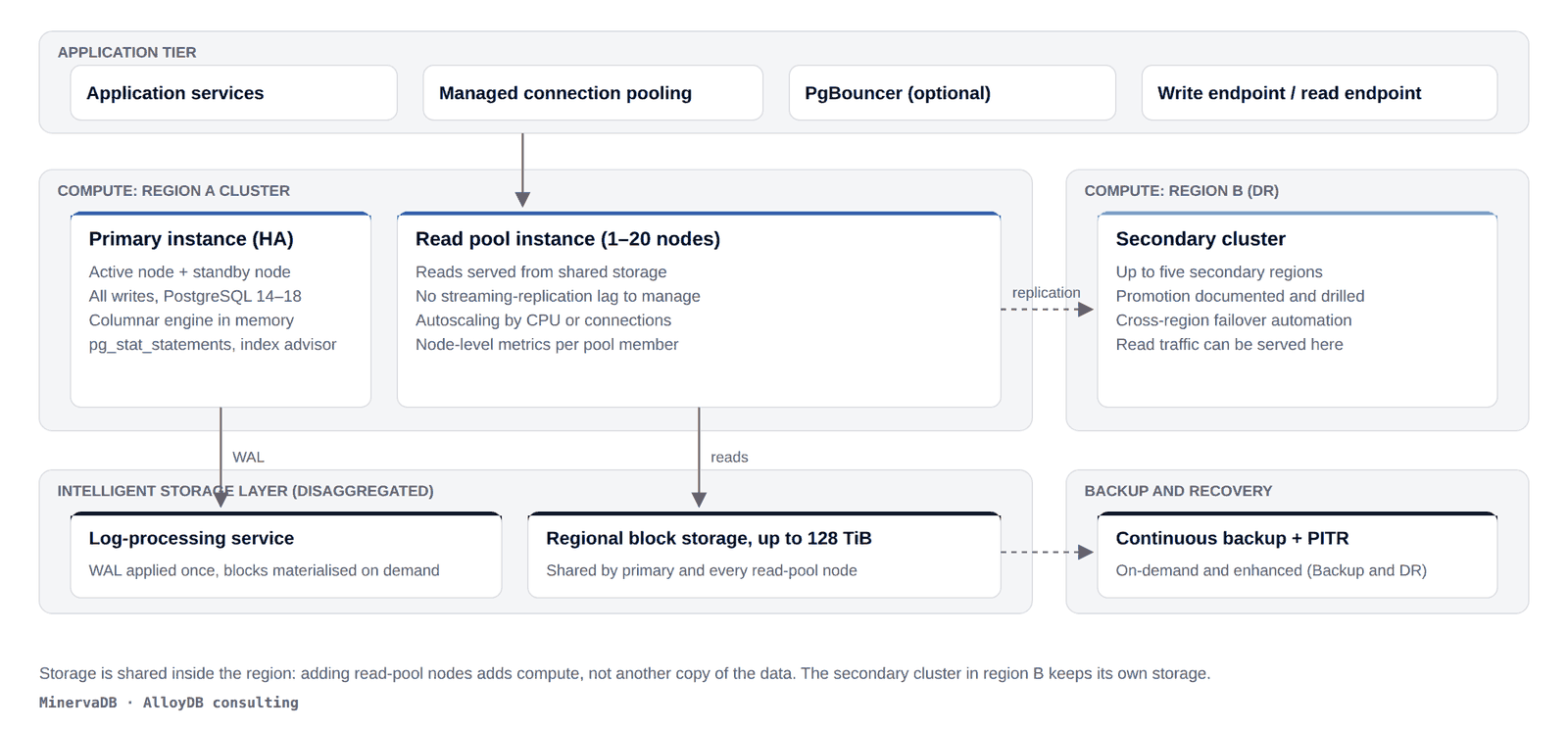
AlloyDB replaces the storage layer and adds a columnar engine, read pools and managed pooling. The planner, MVCC, vacuum and the connection model are still PostgreSQL. Most of what makes an AlloyDB cluster fast or slow is therefore still PostgreSQL engineering.
The storage layer is where AlloyDB departs from community PostgreSQL. Write-ahead log records go to a log-processing service that materialises blocks on demand into regional storage shared by the primary and every read-pool node, up to 128 TiB per cluster. Read pools read the same storage, so the replica-lag management that dominates Cloud SQL and self-managed replica estates largely disappears. A columnar engine keeps selected columns in memory on the primary and read pools for scan-heavy queries. Continuous backup with point-in-time recovery, enhanced backups through the Backup and DR service, and secondary clusters in up to five regions round out the platform.
What has not changed matters more for day-to-day work. Query planning is PostgreSQL query planning: statistics, join strategies, index choice and the cost model behave the way they do on PostgreSQL 14 to 18. Autovacuum still has to keep up with dead tuples. Transaction ID wraparound is still possible. Each connection is still a backend process, so a connection storm still hurts even with managed pooling in front. Lock contention, long transactions holding back vacuum, unbounded IN lists and missing indexes travel to AlloyDB unchanged, and they cost more per vCPU when they get there.
That is the frame for every AlloyDB consulting engagement we take: the platform work is Google's, the database work is ours, and we do not sell instance size as a substitute for either.
02 · Scope
AlloyDB consulting services
Eight lines of AlloyDB consulting work, all delivered by the PostgreSQL engineers who cover our PostgreSQL support and remote DBA customers. Nothing here is a reseller motion; we hold no Google Cloud resale margin and recommend against AlloyDB when the numbers say so.
Migration assessment
The first deliverable of any AlloyDB consulting engagement answers whether AlloyDB is the right target, and we write it down either way. AlloyDB earns its price on write-heavy transactional workloads that also carry reporting load, and on estates that want read scaling without managing replica lag. It usually does not earn it for small databases, for pure analytics that belongs in BigQuery or ClickHouse, or for applications whose bottleneck is the application.
You receive a sizing model from measured CPU, memory, I/O and connection profiles, a compatibility inventory (extensions, procedural languages, foreign data wrappers, logical replication needs, superuser dependencies), a priced comparison against Cloud SQL for PostgreSQL and self-managed PostgreSQL on Compute Engine or GKE, and a written recommendation.
Migration execution
Sources our AlloyDB consulting team moves: self-managed PostgreSQL 12 through 18, Cloud SQL for PostgreSQL, Amazon RDS and Aurora PostgreSQL, Azure Database for PostgreSQL, Oracle Database and Microsoft SQL Server. Schema and PL/SQL or T-SQL conversion where needed, Database Migration Service or logical replication (pglogical, native publication and subscription) for the data, a parallel-run period with row-count and checksum reconciliation, and a rehearsed rollback. Sequences, large objects, extension versions and replication slots are checked explicitly because they are what goes wrong.
Architecture and instance design
Primary sizing from the measured profile, not from the current instance class; this is where AlloyDB consulting pays for itself fastest. Read-pool node count from read throughput and the autoscaling policy that suits its shape. Columnar engine memory and column set from the analytical queries that will actually run. Managed connection pooling or PgBouncer sized against max_connections and application pool limits. Secondary clusters with a promotion runbook that has been executed, not just written. Private Service Connect or VPC peering chosen against the security posture.
Performance engineering
AlloyDB consulting for performance uses the same evidence we use on community PostgreSQL: pg_stat_statements deltas, EXPLAIN (ANALYZE, BUFFERS) on the plans that matter, dead-tuple ratios from pg_stat_user_tables, wait events from pg_stat_activity, plus the AlloyDB-specific columnar engine statistics, index advisor output and per-node read-pool metrics. Changes are staged with a rollback path and verified against the metric that raised them. When the columnar engine does not engage, we find out why before anyone buys a larger machine.
AlloyDB Omni
The same engine outside Google Cloud: on Linux hosts, on Kubernetes through the AlloyDB Omni operator (1.8.x line), on Red Hat OpenShift, or on AWS and Azure infrastructure. We design storage layout, high availability, pgBackRest-based backup and restore, monitoring and the upgrade calendar across the 15.x, 16.x, 17.x and 18.x Omni releases. We will also tell you when community PostgreSQL with Patroni is the better fit; it often is.
Vector search and AlloyDB AI
AlloyDB consulting for vector workloads covers schema and index design for pgvector and ScaNN (including the four-level trees that reach ten-billion-row tables), embedding pipeline integration with the auto vector embedding functions, hybrid search that combines vector similarity with relational filters, and capacity planning measured on your data. Recall, latency and scale decide whether AlloyDB, PostgreSQL with pgvector or a dedicated engine such as Milvus is the right home, and we run that comparison with your vectors rather than a benchmark's.
Security and compliance
AlloyDB consulting on security covers IAM database authentication, customer-managed encryption keys, VPC Service Controls, pgAudit-based audit logging, row-level security, and the evidence packs auditors ask for under SOC 2, HIPAA, PCI DSS, GDPR and India's DPDP Act. For AlloyDB Omni we add transparent data encryption and the STIG and FIPS enforcement the Kubernetes operator now supports.
Health check for existing estates
For clusters already in production, a fixed-scope AlloyDB consulting health check covers plan regressions, vacuum and wraparound headroom, read-pool balance, columnar engine benefit, backup and PITR validation, connection budgets and cost against measured utilisation. It ends in a prioritised, priced list of changes, each with its rollback. Most AlloyDB consulting relationships with existing estates start here.
03 · Migration
How an AlloyDB consulting migration actually runs
Six stages, two rehearsals, one rollback path that stays live until the parallel run has passed. Migration is the largest single line of AlloyDB consulting work we do. The sequence is the same for every source; the schema stage is where Oracle and SQL Server projects spend most of their calendar.
%22/%3E%3Crect%20x=%2230%22%20y=%22194%22%20width=%22178%22%20height=%22150%22%20rx=%228%22%20fill=%22%23ffffff%22%20stroke=%22%23dcdee4%22%20stroke-width=%221%22/%3E%3Cpath%20d=%22M38%20194%20H200%20a8%208%200%200%201%208%208%20V197%20H30%20V202%20a8%208%200%200%201%208%20-8%20Z%22%20fill=%22%230f62fe%22/%3E%3Ctext%20x=%2241%22%20y=%22217%22%20font-size=%2215%22%20font-weight=%22700%22%20fill=%22%230a1424%22%3E1.%20Inventory%3C/text%3E%3Ctext%20x=%2241%22%20y=%22241%22%20font-size=%2212%22%20font-weight=%22500%22%20fill=%22%235b6472%22%3EExtensions,%20PLs,%20FDWs%3C/text%3E%3Ctext%20x=%2241%22%20y=%22259%22%20font-size=%2212%22%20font-weight=%22500%22%20fill=%22%235b6472%22%3ESlots,%20large%20objects%3C/text%3E%3Ctext%20x=%2241%22%20y=%22277%22%20font-size=%2212%22%20font-weight=%22500%22%20fill=%22%235b6472%22%3ESequences,%20collations%3C/text%3E%3Ctext%20x=%2241%22%20y=%22295%22%20font-size=%2212%22%20font-weight=%22500%22%20fill=%22%235b6472%22%3ESuperuser%20dependencies%3C/text%3E%3Cline%20x1=%22209%22%20y1=%22269%22%20x2=%22221%22%20y2=%22269%22%20stroke=%22%235b6472%22%20stroke-width=%221.5%22%20marker-end=%22url(%23mdba-ah1)%22/%3E%3Crect%20x=%22222%22%20y=%22194%22%20width=%22178%22%20height=%22150%22%20rx=%228%22%20fill=%22%23ffffff%22%20stroke=%22%23dcdee4%22%20stroke-width=%221%22/%3E%3Cpath%20d=%22M230%20194%20H392%20a8%208%200%200%201%208%208%20V197%20H222%20V202%20a8%208%200%200%201%208%20-8%20Z%22%20fill=%22%230a1a2f%22/%3E%3Ctext%20x=%22233%22%20y=%22217%22%20font-size=%2215%22%20font-weight=%22700%22%20fill=%22%230a1424%22%3E2.%20Assessment%3C/text%3E%3Ctext%20x=%22233%22%20y=%22241%22%20font-size=%2212%22%20font-weight=%22500%22%20fill=%22%235b6472%22%3EMeasured%20CPU,%20RAM,%20I/O%3C/text%3E%3Ctext%20x=%22233%22%20y=%22259%22%20font-size=%2212%22%20font-weight=%22500%22%20fill=%22%235b6472%22%3ECost%20vs%20Cloud%20SQL,%20GCE%3C/text%3E%3Ctext%20x=%22233%22%20y=%22277%22%20font-size=%2212%22%20font-weight=%22500%22%20fill=%22%235b6472%22%3EFit%20for%20read%20pools%3C/text%3E%3Ctext%20x=%22233%22%20y=%22295%22%20font-size=%2212%22%20font-weight=%22500%22%20fill=%22%235b6472%22%3EWritten%20go%20or%20no-go%3C/text%3E%3Cline%20x1=%22401%22%20y1=%22269%22%20x2=%22413%22%20y2=%22269%22%20stroke=%22%235b6472%22%20stroke-width=%221.5%22%20marker-end=%22url(%23mdba-ah1)%22/%3E%3Crect%20x=%22414%22%20y=%22194%22%20width=%22178%22%20height=%22150%22%20rx=%228%22%20fill=%22%23ffffff%22%20stroke=%22%23dcdee4%22%20stroke-width=%221%22/%3E%3Cpath%20d=%22M422%20194%20H584%20a8%208%200%200%201%208%208%20V197%20H414%20V202%20a8%208%200%200%201%208%20-8%20Z%22%20fill=%22%230f62fe%22/%3E%3Ctext%20x=%22425%22%20y=%22217%22%20font-size=%2215%22%20font-weight=%22700%22%20fill=%22%230a1424%22%3E3.%20Schema%20move%3C/text%3E%3Ctext%20x=%22425%22%20y=%22241%22%20font-size=%2212%22%20font-weight=%22500%22%20fill=%22%235b6472%22%3Epg_dump%20schema-only%3C/text%3E%3Ctext%20x=%22425%22%20y=%22259%22%20font-size=%2212%22%20font-weight=%22500%22%20fill=%22%235b6472%22%3EPL/SQL,%20T-SQL%20rewrite%3C/text%3E%3Ctext%20x=%22425%22%20y=%22277%22%20font-size=%2212%22%20font-weight=%22500%22%20fill=%22%235b6472%22%3EIndex%20and%20FK%20validation%3C/text%3E%3Ctext%20x=%22425%22%20y=%22295%22%20font-size=%2212%22%20font-weight=%22500%22%20fill=%22%235b6472%22%3EExtension%20version%20pins%3C/text%3E%3Cline%20x1=%22593%22%20y1=%22269%22%20x2=%22605%22%20y2=%22269%22%20stroke=%22%235b6472%22%20stroke-width=%221.5%22%20marker-end=%22url(%23mdba-ah1)%22/%3E%3Crect%20x=%22606%22%20y=%22194%22%20width=%22178%22%20height=%22150%22%20rx=%228%22%20fill=%22%23ffffff%22%20stroke=%22%23dcdee4%22%20stroke-width=%221%22/%3E%3Cpath%20d=%22M614%20194%20H776%20a8%208%200%200%201%208%208%20V197%20H606%20V202%20a8%208%200%200%201%208%20-8%20Z%22%20fill=%22%230f62fe%22/%3E%3Ctext%20x=%22617%22%20y=%22217%22%20font-size=%2215%22%20font-weight=%22700%22%20fill=%22%230a1424%22%3E4.%20Data%20sync%3C/text%3E%3Ctext%20x=%22617%22%20y=%22241%22%20font-size=%2212%22%20font-weight=%22500%22%20fill=%22%235b6472%22%3EDatabase%20Migration%20Svc%3C/text%3E%3Ctext%20x=%22617%22%20y=%22259%22%20font-size=%2212%22%20font-weight=%22500%22%20fill=%22%235b6472%22%3Eor%20logical%20replication%3C/text%3E%3Ctext%20x=%22617%22%20y=%22277%22%20font-size=%2212%22%20font-weight=%22500%22%20fill=%22%235b6472%22%3Epglogical,%20pub%20and%20sub%3C/text%3E%3Ctext%20x=%22617%22%20y=%22295%22%20font-size=%2212%22%20font-weight=%22500%22%20fill=%22%235b6472%22%3ELag%20watched%20per%20table%3C/text%3E%3Cline%20x1=%22785%22%20y1=%22269%22%20x2=%22797%22%20y2=%22269%22%20stroke=%22%235b6472%22%20stroke-width=%221.5%22%20marker-end=%22url(%23mdba-ah1)%22/%3E%3Crect%20x=%22798%22%20y=%22194%22%20width=%22178%22%20height=%22150%22%20rx=%228%22%20fill=%22%23ffffff%22%20stroke=%22%23dcdee4%22%20stroke-width=%221%22/%3E%3Cpath%20d=%22M806%20194%20H968%20a8%208%200%200%201%208%208%20V197%20H798%20V202%20a8%208%200%200%201%208%20-8%20Z%22%20fill=%22%230f62fe%22/%3E%3Ctext%20x=%22809%22%20y=%22217%22%20font-size=%2215%22%20font-weight=%22700%22%20fill=%22%230a1424%22%3E5.%20Parallel%20run%3C/text%3E%3Ctext%20x=%22809%22%20y=%22241%22%20font-size=%2212%22%20font-weight=%22500%22%20fill=%22%235b6472%22%3ERow%20counts,%20checksums%3C/text%3E%3Ctext%20x=%22809%22%20y=%22259%22%20font-size=%2212%22%20font-weight=%22500%22%20fill=%22%235b6472%22%3ESequence%20positions%3C/text%3E%3Ctext%20x=%22809%22%20y=%22277%22%20font-size=%2212%22%20font-weight=%22500%22%20fill=%22%235b6472%22%3EApplication%20regression%3C/text%3E%3Ctext%20x=%22809%22%20y=%22295%22%20font-size=%2212%22%20font-weight=%22500%22%20fill=%22%235b6472%22%3ERead%20pool%20warm-up%3C/text%3E%3Cline%20x1=%22977%22%20y1=%22269%22%20x2=%22989%22%20y2=%22269%22%20stroke=%22%235b6472%22%20stroke-width=%221.5%22%20marker-end=%22url(%23mdba-ah1)%22/%3E%3Crect%20x=%22990%22%20y=%22194%22%20width=%22178%22%20height=%22150%22%20rx=%228%22%20fill=%22%23ffffff%22%20stroke=%22%23dcdee4%22%20stroke-width=%221%22/%3E%3Cpath%20d=%22M998%20194%20H1160%20a8%208%200%200%201%208%208%20V197%20H990%20V202%20a8%208%200%200%201%208%20-8%20Z%22%20fill=%22%230a1a2f%22/%3E%3Ctext%20x=%221001%22%20y=%22217%22%20font-size=%2215%22%20font-weight=%22700%22%20fill=%22%230a1424%22%3E6.%20Cutover%3C/text%3E%3Ctext%20x=%221001%22%20y=%22241%22%20font-size=%2212%22%20font-weight=%22500%22%20fill=%22%235b6472%22%3ERehearsed%20twice%3C/text%3E%3Ctext%20x=%221001%22%20y=%22259%22%20font-size=%2212%22%20font-weight=%22500%22%20fill=%22%235b6472%22%3ERollback%20kept%20live%3C/text%3E%3Ctext%20x=%221001%22%20y=%22277%22%20font-size=%2212%22%20font-weight=%22500%22%20fill=%22%235b6472%22%3EEndpoint%20switch%3C/text%3E%3Ctext%20x=%221001%22%20y=%22295%22%20font-size=%2212%22%20font-weight=%22500%22%20fill=%22%235b6472%22%3EHypercare%2072%20hours%3C/text%3E%3Cpath%20d=%22M1150%20344%20V392%20H130%20V348%22%20fill=%22none%22%20stroke=%22%235b6472%22%20stroke-width=%221.5%22%20stroke-dasharray=%225%204%22%20marker-end=%22url(%23mdba-ah1)%22/%3E%3Ctext%20x=%22600%22%20y=%22412%22%20font-size=%2212.5%22%20font-weight=%22500%22%20fill=%22%235b6472%22%20text-anchor=%22middle%22%3Erollback%20path%3C/text%3E%3C/svg%3E)
What breaks, and where we look first
- Extensions that are not in the AlloyDB catalogue, and extension versions that differ from the source. The inventory is done with
pg_extensionandpg_available_extensionson both sides before anything is moved. - Sequences. Logical replication does not carry sequence state, so every sequence is advanced past the source's last value before the application writes.
- Large objects and
pg_largeobject, which Database Migration Service does not replicate and logical replication does not publish. They move separately, with a checksum. - Replication slots left behind on the source, and the WAL they pin. We remove them as part of the cutover checklist, not afterwards.
- Superuser habits:
COPY ... TO PROGRAM, untrusted procedural languages, file-system access. They show up in the inventory, and the fix is an application change, not a workaround.
Oracle and SQL Server sources
PL/SQL and T-SQL conversion is the long pole. We use ora2pg and Google's conversion tooling to do the mechanical part, then rewrite what they cannot: packages with state, autonomous transactions, MERGE semantics, cursor-heavy procedures, and the Oracle-specific date and NULL handling that silently changes results. Our Oracle practice and SQL Server practice work alongside the AlloyDB consulting team on these projects, and the application team owns the regression suite that decides when cutover is allowed.
Where the schema is large, we cut over in domains behind a routing layer rather than in one weekend. It is slower on the calendar and much safer on the night.
04 · Platform choice
AlloyDB, Cloud SQL for PostgreSQL, or self-managed PostgreSQL
Platform choice is the part of AlloyDB consulting that most often ends in a recommendation not to buy AlloyDB. We model the workload against all three with list prices, committed-use discounts where the estate is stable, and the operating cost of the self-managed option. The recommendation is not tied to what we sell.
%3C/text%3E%3Crect%20x=%22390%22%20y=%22260%22%20width=%22460%22%20height=%2280%22%20rx=%228%22%20fill=%22%23ffffff%22%20stroke=%22%23dcdee4%22%20stroke-width=%221%22/%3E%3Cpath%20d=%22M398%20260%20H842%20a8%208%200%200%201%208%208%20V263%20H390%20V268%20a8%208%200%200%201%208%20-8%20Z%22%20fill=%22%230f62fe%22/%3E%3Ctext%20x=%22404%22%20y=%22285.2%22%20font-size=%2214%22%20font-weight=%22700%22%20fill=%22%230a1424%22%3EStandard%20OLTP,%20moderate%20scale,%20smallest%20ops%20footprint%3F%3C/text%3E%3Ctext%20x=%22404%22%20y=%22310.2%22%20font-size=%2213%22%20font-weight=%22500%22%20fill=%22%235b6472%22%3Eyes%20%E2%86%92%20Cloud%20SQL%20for%20PostgreSQL%3C/text%3E%3Cline%20x1=%22332%22%20y1=%2292%22%20x2=%22388%22%20y2=%2280%22%20stroke=%22%235b6472%22%20stroke-width=%221.5%22%20marker-end=%22url(%23mdba-ah2)%22/%3E%3Cline%20x1=%22620%22%20y1=%22122%22%20x2=%22620%22%20y2=%22148%22%20stroke=%22%235b6472%22%20stroke-width=%221.5%22%20marker-end=%22url(%23mdba-ah2)%22/%3E%3Ctext%20x=%22629%22%20y=%22139%22%20font-size=%2211.5%22%20font-weight=%22500%22%20fill=%22%235b6472%22%3Eno%3C/text%3E%3Cline%20x1=%22620%22%20y1=%22232%22%20x2=%22620%22%20y2=%22258%22%20stroke=%22%235b6472%22%20stroke-width=%221.5%22%20marker-end=%22url(%23mdba-ah2)%22/%3E%3Ctext%20x=%22629%22%20y=%22249%22%20font-size=%2211.5%22%20font-weight=%22500%22%20fill=%22%235b6472%22%3Eno%3C/text%3E%3Crect%20x=%22900%22%20y=%2240%22%20width=%22270%22%20height=%2284%22%20rx=%228%22%20fill=%22%23f4f5f7%22%20stroke=%22%23dcdee4%22%20stroke-width=%221%22/%3E%3Ctext%20x=%22914%22%20y=%2266%22%20font-size=%2215%22%20font-weight=%22700%22%20fill=%22%230a1424%22%3ESelf-managed%20PostgreSQL%3C/text%3E%3Ctext%20x=%22914%22%20y=%2290.5%22%20font-size=%2212.5%22%20font-weight=%22500%22%20fill=%22%235b6472%22%3EPatroni,%20pgBackRest,%20any%20extension%3C/text%3E%3Ctext%20x=%22914%22%20y=%22109%22%20font-size=%2212.5%22%20font-weight=%22500%22%20fill=%22%235b6472%22%3ELowest%20infra%20cost,%20highest%20ops%20load%3C/text%3E%3Crect%20x=%22900%22%20y=%22150%22%20width=%22270%22%20height=%2284%22%20rx=%228%22%20fill=%22%23f4f5f7%22%20stroke=%22%23dcdee4%22%20stroke-width=%221%22/%3E%3Ctext%20x=%22914%22%20y=%22176%22%20font-size=%2215%22%20font-weight=%22700%22%20fill=%22%230a1424%22%3EAlloyDB%3C/text%3E%3Ctext%20x=%22914%22%20y=%22200.5%22%20font-size=%2212.5%22%20font-weight=%22500%22%20fill=%22%235b6472%22%3EHighest%20per-vCPU%20price%3C/text%3E%3Ctext%20x=%22914%22%20y=%22219%22%20font-size=%2212.5%22%20font-weight=%22500%22%20fill=%22%235b6472%22%3EShared%20storage,%20read%20pools,%20columnar%3C/text%3E%3Crect%20x=%22900%22%20y=%22260%22%20width=%22270%22%20height=%2284%22%20rx=%228%22%20fill=%22%23f4f5f7%22%20stroke=%22%23dcdee4%22%20stroke-width=%221%22/%3E%3Ctext%20x=%22914%22%20y=%22286%22%20font-size=%2215%22%20font-weight=%22700%22%20fill=%22%230a1424%22%3ECloud%20SQL%20for%20PostgreSQL%3C/text%3E%3Ctext%20x=%22914%22%20y=%22310.5%22%20font-size=%2212.5%22%20font-weight=%22500%22%20fill=%22%235b6472%22%3EMiddle%20price%20band%3C/text%3E%3Ctext%20x=%22914%22%20y=%22329%22%20font-size=%2212.5%22%20font-weight=%22500%22%20fill=%22%235b6472%22%3EStreaming%20replicas%20with%20lag%3C/text%3E%3Cline%20x1=%22852%22%20y1=%2280%22%20x2=%22896%22%20y2=%2280%22%20stroke=%22%235b6472%22%20stroke-width=%221.5%22%20marker-end=%22url(%23mdba-ah2)%22/%3E%3Cline%20x1=%22852%22%20y1=%22190%22%20x2=%22896%22%20y2=%22190%22%20stroke=%22%235b6472%22%20stroke-width=%221.5%22%20marker-end=%22url(%23mdba-ah2)%22/%3E%3Cline%20x1=%22852%22%20y1=%22300%22%20x2=%22896%22%20y2=%22300%22%20stroke=%22%235b6472%22%20stroke-width=%221.5%22%20marker-end=%22url(%23mdba-ah2)%22/%3E%3C/svg%3E)
| Dimension | AlloyDB | Cloud SQL for PostgreSQL | Self-managed PostgreSQL on GCE or GKE |
|---|---|---|---|
| Best fit | Write-heavy OLTP with reporting on the same data; read scaling without lag management; vector search next to relational rows | Standard OLTP at moderate scale where the team wants the smallest operating footprint | Extension-heavy workloads, full configuration control, cost-sensitive large estates |
| Read scaling | Read pools on shared storage, 1 to 20 nodes, autoscaling | Read replicas over streaming replication, lag to manage | Replicas you design: Patroni, streaming or logical, your tooling |
| Analytics on OLTP data | Columnar engine in memory on primary and read pools | Row store only; offload to BigQuery for analytics | Columnar extensions, or offload |
| Extensions and privileges | Curated list, no superuser | Curated list, no superuser | Anything, full control, full responsibility |
| Major versions | PostgreSQL 14, 15, 16, 17 (default), 18 | Follows community releases | Anything the community supports |
| Operating load on your team | Low for the platform; database work remains | Low for the platform; database work remains | High unless a remote DBA carries it |
| Cost shape | Highest per vCPU and GiB; storage shared across read pools; 1- and 3-year CUDs | Middle band; per-replica storage | Lowest infrastructure cost plus the people to run it |
05 · Operations
AlloyDB consulting for day-to-day operations
This is the work the managed platform leaves with the database owner. On a support retainer we carry it; on an AlloyDB consulting engagement we hand over the runbook that does.
Vacuum, bloat and wraparound
Per-table autovacuum thresholds and cost limits tuned from dead-tuple ratios in pg_stat_user_tables. The age of datfrozenxid is watched against the wraparound horizon on every database, including the ones nobody remembers creating. Rebuilds are scheduled where bloat has accumulated. A wraparound-forced shutdown is as possible on AlloyDB as anywhere else without this watch.
Connections and pooling
max_connections sized to the instance, managed connection pooling or PgBouncer in front, and application pool limits that sum to less than what the primary can hold. The write endpoint and read endpoint keep application configuration stable through failover.
Statistics and plans
Plan regressions after data growth or a major version change are found in pg_stat_statements deltas and fixed with targeted ANALYZE, extended statistics, an index, or occasionally a planner setting. Each change carries the before-and-after plan in the record.
Read pools and the columnar engine
Node count adjusted from measured read throughput and the autoscaling cooldown. Columnar engine memory and column set reviewed monthly against the queries expected to benefit, using the columnar statistics views to confirm the benefit is real rather than assumed.
Backups, PITR and DR drills
Continuous backup retention set from the recovery objectives, on-demand backups before risky changes, enhanced backups where Backup and DR policy requires them, and quarterly restore and promotion drills with the measured recovery time written down.
Versions and maintenance windows
Maintenance windows and deny periods set deliberately. Major upgrades tested on a cloned cluster with the application's regression suite before the production window, with rollback agreed in writing.
%22/%3E%3Crect%20x=%22322%22%20y=%2260%22%20width=%22262%22%20height=%22150%22%20rx=%228%22%20fill=%22%23ffffff%22%20stroke=%22%23dcdee4%22%20stroke-width=%221%22/%3E%3Cpath%20d=%22M330%2060%20H576%20a8%208%200%200%201%208%208%20V63%20H322%20V68%20a8%208%200%200%201%208%20-8%20Z%22%20fill=%22%230f62fe%22/%3E%3Ctext%20x=%22336%22%20y=%2286.8%22%20font-size=%2216%22%20font-weight=%22700%22%20fill=%22%230a1424%22%3E2.%20Explain%3C/text%3E%3Ctext%20x=%22336%22%20y=%22111.8%22%20font-size=%2213%22%20font-weight=%22500%22%20fill=%22%235b6472%22%3EEXPLAIN%20(ANALYZE,%20BUFFERS)%3C/text%3E%3Ctext%20x=%22336%22%20y=%22130.8%22%20font-size=%2213%22%20font-weight=%22500%22%20fill=%22%235b6472%22%3Eplanner%20statistics%20age%3C/text%3E%3Ctext%20x=%22336%22%20y=%22149.8%22%20font-size=%2213%22%20font-weight=%22500%22%20fill=%22%235b6472%22%3Eindex%20advisor%20findings%3C/text%3E%3Ctext%20x=%22336%22%20y=%22168.8%22%20font-size=%2213%22%20font-weight=%22500%22%20fill=%22%235b6472%22%3Ebloat:%20dead-tuple%20ratios%3C/text%3E%3Cline%20x1=%22586%22%20y1=%22135%22%20x2=%22612%22%20y2=%22135%22%20stroke=%22%235b6472%22%20stroke-width=%221.5%22%20marker-end=%22url(%23mdba-ah3)%22/%3E%3Crect%20x=%22614%22%20y=%2260%22%20width=%22262%22%20height=%22150%22%20rx=%228%22%20fill=%22%23ffffff%22%20stroke=%22%23dcdee4%22%20stroke-width=%221%22/%3E%3Cpath%20d=%22M622%2060%20H868%20a8%208%200%200%201%208%208%20V63%20H614%20V68%20a8%208%200%200%201%208%20-8%20Z%22%20fill=%22%230a1a2f%22/%3E%3Ctext%20x=%22628%22%20y=%2286.8%22%20font-size=%2216%22%20font-weight=%22700%22%20fill=%22%230a1424%22%3E3.%20Change%3C/text%3E%3Ctext%20x=%22628%22%20y=%22111.8%22%20font-size=%2213%22%20font-weight=%22500%22%20fill=%22%235b6472%22%3Eone%20change%20per%20ticket%3C/text%3E%3Ctext%20x=%22628%22%20y=%22130.8%22%20font-size=%2213%22%20font-weight=%22500%22%20fill=%22%235b6472%22%3Estaged%20on%20a%20cloned%20cluster%3C/text%3E%3Ctext%20x=%22628%22%20y=%22149.8%22%20font-size=%2213%22%20font-weight=%22500%22%20fill=%22%235b6472%22%3Erollback%20SQL%20written%20first%3C/text%3E%3Ctext%20x=%22628%22%20y=%22168.8%22%20font-size=%2213%22%20font-weight=%22500%22%20fill=%22%235b6472%22%3Ewindow%20agreed%20with%20owner%3C/text%3E%3Cline%20x1=%22878%22%20y1=%22135%22%20x2=%22904%22%20y2=%22135%22%20stroke=%22%235b6472%22%20stroke-width=%221.5%22%20marker-end=%22url(%23mdba-ah3)%22/%3E%3Crect%20x=%22906%22%20y=%2260%22%20width=%22262%22%20height=%22150%22%20rx=%228%22%20fill=%22%23ffffff%22%20stroke=%22%23dcdee4%22%20stroke-width=%221%22/%3E%3Cpath%20d=%22M914%2060%20H1160%20a8%208%200%200%201%208%208%20V63%20H906%20V68%20a8%208%200%200%201%208%20-8%20Z%22%20fill=%22%230f62fe%22/%3E%3Ctext%20x=%22920%22%20y=%2286.8%22%20font-size=%2216%22%20font-weight=%22700%22%20fill=%22%230a1424%22%3E4.%20Verify%3C/text%3E%3Ctext%20x=%22920%22%20y=%22111.8%22%20font-size=%2213%22%20font-weight=%22500%22%20fill=%22%235b6472%22%3Esame%20query,%20same%20metric%3C/text%3E%3Ctext%20x=%22920%22%20y=%22130.8%22%20font-size=%2213%22%20font-weight=%22500%22%20fill=%22%235b6472%22%3Ep95%20latency%20before%20/%20after%3C/text%3E%3Ctext%20x=%22920%22%20y=%22149.8%22%20font-size=%2213%22%20font-weight=%22500%22%20fill=%22%235b6472%22%3Ebuffers%20hit%20vs%20read%3C/text%3E%3Ctext%20x=%22920%22%20y=%22168.8%22%20font-size=%2213%22%20font-weight=%22500%22%20fill=%22%235b6472%22%3Eplan%20attached%20to%20record%3C/text%3E%3Cpath%20d=%22M1100%20212%20V262%20H160%20V214%22%20fill=%22none%22%20stroke=%22%235b6472%22%20stroke-width=%221.5%22%20stroke-dasharray=%225%204%22%20marker-end=%22url(%23mdba-ah3)%22/%3E%3Ctext%20x=%22600%22%20y=%22288%22%20font-size=%2213%22%20font-weight=%22600%22%20fill=%22%230a1424%22%20text-anchor=%22middle%22%3EThe%20loop%20closes%20on%20the%20metric%20that%20opened%20it.%20A%20change%20that%20cannot%20be%20measured%20is%20not%20shipped.%3C/text%3E%3C/svg%3E)
Two checks AlloyDB consulting runs on every new estate
The first tells us whether the columnar engine is carrying the analytical load it was bought for. The second finds the statements that dominate total time, which is where a plan regression hides.
-- Columnar engine: which columns are populated, and how large they are in memory
SELECT database_name, schema_name, relation_name, column_name,
       size_in_bytes
FROM   g_columnar_columns
ORDER  BY size_in_bytes DESC
LIMIT  20;

-- Workload profile: top statements by total execution time (PostgreSQL 14+ column names)
SELECT calls,
       ROUND(total_exec_time::numeric, 1)            AS total_ms,
       ROUND(mean_exec_time::numeric, 2)             AS mean_ms,
       shared_blks_hit, shared_blks_read,
       LEFT(query, 90)                               AS query
FROM   pg_stat_statements
ORDER  BY total_exec_time DESC
LIMIT  25;
Run these against a read-pool node first, and reset pg_stat_statements on a known schedule so the deltas mean something. Test every change on a non-production cluster before it reaches production.
06 · Lifecycle
AlloyDB versions and the support calendar
Version choice is a cost decision as much as a feature decision, and it is a standing item in every AlloyDB consulting review. Extended support runs three years past the community end of life and is billed per vCPU, on the primary and every read-pool node, and on both nodes of an HA primary.
| AlloyDB major version | Current minor | Status | Extended support begins | Deprecation |
|---|---|---|---|---|
| PostgreSQL 18 | 18.3 | GA since March 2026; in-place upgrade from 14 to 17 | Not yet scheduled | Not yet scheduled |
| PostgreSQL 17 | 17.9 | Default for new clusters | 1 February 2030 | 1 February 2033 |
| PostgreSQL 16 | 16.13 | Regular support | 1 February 2029 | 1 February 2032 |
| PostgreSQL 15 | 15.17 | Regular support | 1 February 2028 | 1 February 2031 |
| PostgreSQL 14 | 14.22 | Regular support; plan the upgrade now | 1 February 2027 | 1 February 2030 |
Source: Google Cloud AlloyDB database version policies and release notes, checked September 2026. AlloyDB Omni ships the same lines (15.17.0, 16.13.0, 17.9.0, 18.3.0) with Kubernetes operator 1.8.1.
What arrived in the last year that changes designs
- PostgreSQL 18 compatibility (GA March 2026) and PostgreSQL 17 (GA September 2025), both with in-place major upgrades.
- Read-pool autoscaling (preview since November 2025) and node-level read-pool metrics, which finally make pool sizing a measured decision.
- Write endpoints (preview, July 2026) and cross-region failover automation (preview, July 2026), which shorten the promotion runbook.
- C4 machines up to 288 vCPU and 2,232 GiB, C4A Arm machines on Axion, and Z3 storage-heavy shapes, which change the price-per-throughput arithmetic.
- ScaNN four-level trees for very large vector tables, auto vector embeddings and AI functions (GA March 2026), and HNSW caching in the columnar engine (September 2026).
How we use the calendar
AlloyDB consulting on lifecycle is simple: we keep every estate on a version with at least three years of regular support ahead of it, and we schedule the major upgrade a year before extended support begins so the per-vCPU surcharge is never paid. Preview features are used in non-production first and only reach production once Google marks them GA, with one exception: we will run a preview feature in production when the customer has accepted the support terms in writing and the rollback is trivial.
Our PostgreSQL consulting practice tracks the community release calendar; the AlloyDB calendar is derived from it, which is why the two teams are the same people.
07 · Sizing and cost
AlloyDB consulting on sizing: paying only for what you use
AlloyDB bills per vCPU-hour and per GiB-hour on the primary and on every read-pool node, plus regional storage, backup storage, and network egress. The common mistake is to size for the peaks of an untuned workload and then commit to them for three years; AlloyDB consulting on sizing exists to prevent exactly that.
Where the money goes
| Component | Billed on | What moves it |
|---|---|---|
| Compute | vCPU-hour and GiB-hour, N2, C4A, C4 or Z3 series; HA primary counts two nodes | Machine series, HA on or off, read-pool node count, autoscaling policy |
| Committed use | 1-year and 3-year CUDs on compute | Only after the workload is tuned and the size has held for a month |
| Storage | Regional cluster storage per GiB-hour, shared by all instances | Data volume, bloat, retained WAL; read pools add no storage cost |
| Backup | Backup storage per GiB-hour; first seven days of logs included | Retention window, on-demand backups, enhanced backup policy |
| Network | Cross-region and internet egress per GiB; Private Service Connect per endpoint-hour | Secondary regions, analytics exports, client placement |
| Extended support | Per vCPU-hour, roughly doubling in year three | Staying on a major version past community end of life |
How the sizing model is built
We start from the measured CPU, memory, I/O and connection profile of the current system, apply the query and schema fixes found in the assessment, and only then size the AlloyDB primary and read pools. Because the fixes usually remove the peaks that drove the original instance class, the model lands on a smaller machine than the first estimate more often than not. We do not publish a percentage for that; it depends entirely on how untuned the source was.
The AlloyDB consulting sizing model is a spreadsheet with every assumption labelled, reviewed against actual utilisation after the first month in production, and revisited before any committed-use purchase. AlloyDB AI features carry no separate charge, but Gemini model calls from inside the database are billed by the model provider and are modelled as a line of their own.
08 · Support
24×7 AlloyDB support with named engineers
Google Cloud supports the platform. We support the database: query performance, schema design, replication and failover procedure, capacity, cost, and incident response with a written root-cause analysis after every S1. Support is where AlloyDB consulting turns into a standing relationship.

What the retainer includes
- Onboarding health check and the operational runbook for your estate
- Monitoring wired into Cloud Monitoring, Prometheus or Datadog, with alert thresholds we own
- Severity matrix: S1 acknowledged within 15 minutes around the clock, S2 within 12 hours, S3 within 24 hours, S4 within 48 hours
- Monthly health report: plans, vacuum headroom, read-pool balance, columnar benefit, backup validation, cost against the model
- Quarterly restore and failover drills with measured recovery time
- Advisory hours for schema reviews, capacity questions and version planning
- We open and drive the Google Cloud support case when the fault is on the platform
How this differs from Google Cloud support
A Google case will confirm whether the platform is healthy. It will not tell you that autovacuum_vacuum_cost_limit is too low on your three largest tables, that a read pool has one hot node because a session-pinned pooler is routing badly, or that the columnar engine is holding columns nobody scans. That work sits with the database owner, and on a retainer it sits with us. The same engineers cover our PostgreSQL support customers, which is deliberate: AlloyDB support is PostgreSQL support with a few extra views to read.
Every S1 ends in a root-cause document with the timeline, the evidence, the fix and the change that prevents recurrence. If the cause was on the platform, the document says so and carries the Google case reference.
09 · Pricing
AlloyDB consulting and support pricing
Published AlloyDB consulting rates, fixed scopes where the work can be scoped, and no platform resale in the middle.
Consulting
USD 300 per hour remote, USD 500 per hour on site plus travel. Used for AlloyDB consulting assessments, architecture reviews, performance work and migration execution where the scope cannot be fixed up front.
Support and remote DBA
Retainers from USD 4,500 per quarter, sized by cluster count, data volume and the coverage window. Includes the severity matrix, monitoring, monthly reporting and drills described above.
Migration and assessment projects
Quoted on a fixed scope after a short scoping call: source inventory, data volume, procedural code volume, cutover constraints. The assessment can be bought alone and its findings stand whether or not we do the migration.
Standing conditions on every engagement: changes are tested on a non-production cluster first; verified backups precede any schema or version change; and estates whose data warrants it keep a cross-region secondary with a drilled promotion procedure.
10 · FAQ
AlloyDB consulting: frequently asked questions
Short answers to the AlloyDB consulting questions we are asked before a scoping call.
Is AlloyDB fully compatible with PostgreSQL?
For applications, effectively yes: the SQL dialect, drivers, most extensions and the tooling work unchanged, and AlloyDB tracks PostgreSQL 14 through 18. Operationally you give up superuser access and some configuration control, and a small number of extensions are not offered. The assessment checks your specific inventory before we recommend a move.
Should we move from Cloud SQL for PostgreSQL to AlloyDB?
Our AlloyDB consulting answer is: only if the workload benefits from the shared storage layer, read pools or the columnar engine enough to cover the higher per-vCPU price. We measure that on your workload during the assessment and give you a written recommendation either way. A moderate-scale OLTP application with no analytical load usually stays on Cloud SQL.
Can you migrate us from Oracle or SQL Server to AlloyDB?
Yes. Schema conversion, PL/SQL and T-SQL rewrite, data migration with reconciliation, and the application-layer changes are all in scope, with our Oracle and SQL Server practices working alongside the AlloyDB consulting team. Expect the procedural code to set the timeline.
Do you support AlloyDB Omni outside Google Cloud?
Yes: on Linux hosts, on Kubernetes through the AlloyDB Omni operator, on Red Hat OpenShift, and on AWS or Azure infrastructure. We also advise when community PostgreSQL with Patroni is the better fit for that footprint.
How does AlloyDB support from MinervaDB differ from Google Cloud support?
Google supports the platform. We support the database: query performance, schema design, replication and failover procedure, capacity, cost and incident response with a root-cause analysis after every S1. When the fault is on the platform we open and drive the Google case.
Which AlloyDB version should a new cluster use?
PostgreSQL 17 is the default and has regular support until February 2030; PostgreSQL 18 has been GA since March 2026 and is the right choice when your extensions and drivers have been validated on it. We keep every estate at least three years ahead of extended support so the per-vCPU surcharge is never paid.
Does the columnar engine replace a data warehouse?
No. It accelerates scan-heavy queries on operational data inside the cluster's memory budget. Workloads that need large historical scans, many concurrent analysts or cross-source joins still belong in BigQuery or ClickHouse, and we will say so in the assessment.
How do we get started with AlloyDB consulting?
Book a scoping call and you receive a written scope with a fixed price where the work allows it. Existing AlloyDB estates usually begin with the health check; new adopters begin with the migration assessment.
Related practices
Further reading
Adjacent MinervaDB practices that work alongside AlloyDB consulting engagements, and the primary Google Cloud references our AlloyDB consulting work relies on.
MinervaDB
- PostgreSQL consulting — the practice AlloyDB work is built on
- 24×7 PostgreSQL support and PostgreSQL remote DBA
- BigQuery consulting — where the analytics that does not fit the columnar engine goes
- Oracle consulting and SQL Server consulting — migration sources
- ClickHouse consulting — real-time analytics at a scale the columnar engine is not built for
Next step
Talk to a Principal Architect about AlloyDB
A 30-minute AlloyDB consulting scoping call, then a written scope. If AlloyDB is not the right target for your workload, the call is where we will say so.