SQL Server 2025 went generally available on 18 November 2025 and, as of this writing, sits at Cumulative Update 8 (build 17.0.4075.5, 13 August 2026). Strip away the AI features that took most of the launch coverage and there are four changes in this release that alter how a production SQL Server behaves under load and during a failover.
The first is optimized locking, which replaces per-row locks held to commit with a single transaction-ID lock. The second is tempdb space governance and ADR in tempdb, which turn the most common cause of a 3 a.m. outage into a per-workload error. The third is a set of Always On availability group knobs (a configurable group commit time, endpoint flow control, immediate failover on persistent health issues, full and differential backups on secondaries). The fourth is a new Standard edition ceiling of 32 cores and 256 GB of buffer pool with Resource Governor included, which is the largest scalability change for mid-market estates since 2016 SP1.
This post works through each of them for SQL Server 2025 performance, scalability and high availability, with the T-SQL to enable and verify them, and then lays out what is and is not available when the same engine runs in Azure SQL Managed Instance, Azure SQL Database, and Amazon RDS.
Everything here is version-pinned to 17.x and was checked against the current Microsoft Learn documentation. Where a feature is preview-only behind PREVIEW_FEATURES, I say so, because those are not production features however good the demo looks.
Which SQL Server 2025 build you should be on
The release cadence has settled into a monthly CU. The builds that matter for a production plan:
| Build | Version | Date | Why it matters |
|---|---|---|---|
| RTM (GA) | 17.0.1000.x | 18 Nov 2025 | Lifecycle start; mainstream support ends 7 Jan 2031, extended 7 Jan 2036 |
| CU3 | 17.0.4025.3 | 12 Mar 2026 | Microsoft Entra authentication for Change Event Streaming on Arc-enabled and Azure VM instances |
| CU6 + GDR | 17.0.4060.2 | 14 Jul 2026 | Security-only branch for estates that cannot take CUs |
| CU8 | 17.0.4075.5 | 13 Aug 2026 | Current CU at time of writing; the baseline I recommend for a new deployment |
Two edition facts change the sizing conversation before any feature does. Standard edition now runs on the lesser of 4 sockets or 32 cores and addresses 256 GB of buffer pool, up from 24 cores and 128 GB in 2022, and it gets Resource Governor for the first time. Web edition is discontinued, and Express grows to a 50 GB database limit with the Advanced Services features folded in. A great many Enterprise licences in the field exist only because a 24-core or 128 GB ceiling was in the way; on SQL Server 2025 that argument needs re-examining with the actual workload numbers.
Performance: optimized locking is the feature to plan around
Optimized locking arrived in Azure SQL Database in 2023 and is on by default there. SQL Server 2025 brings it on-premises as an opt-in per database, and it is the single largest change to the engine's concurrency behaviour since row versioning. It has two parts. Transaction ID (TID) locking: every row already carries the transaction ID of the last writer, so instead of holding an X lock on every modified row until commit, the engine takes an X lock on the transaction ID itself and releases the row and page locks as soon as each row is written; anyone who needs to wait for that row takes an S lock on the TID.
Lock after qualification (LAQ): with read committed snapshot isolation on, an UPDATE or DELETE evaluates its predicate against the latest committed row version without taking a U lock first, and only locks rows that actually qualify.
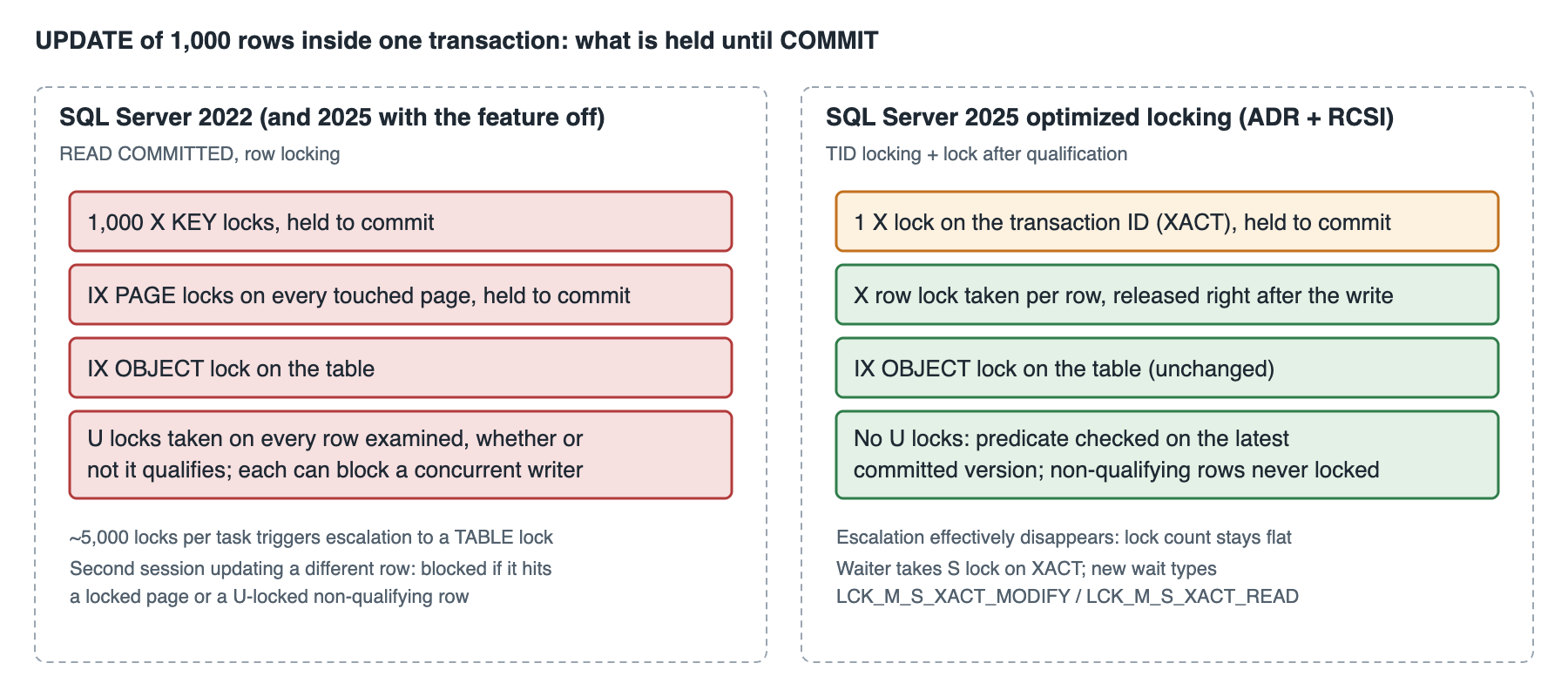
Enabling it on SQL Server 2025 is three statements, in this order, because optimized locking requires accelerated database recovery (the persistent version store is what makes releasing row locks early safe) and LAQ only works under RCSI:
-- SQL Server 2025: enable optimized locking on one database, in dependency order.
-- ADR is a prerequisite; RCSI is required for the LAQ half of the feature.
-- ALTER DATABASE ... SET READ_COMMITTED_SNAPSHOT needs exclusive access: schedule it.
ALTER DATABASE [ops] SET ACCELERATED_DATABASE_RECOVERY = ON;
ALTER DATABASE [ops] SET READ_COMMITTED_SNAPSHOT = ON WITH ROLLBACK IMMEDIATE;
ALTER DATABASE [ops] SET OPTIMIZED_LOCKING = ON;

-- Verify all three; every column must be 1
SELECT name,
       is_accelerated_database_recovery_on,
       is_read_committed_snapshot_on,
       is_optimized_locking_on
FROM   sys.databases
WHERE  name = N'ops';

-- Rollback path: reverse order. Optimized locking must be off before ADR can be turned off.
-- ALTER DATABASE [ops] SET OPTIMIZED_LOCKING = OFF;
-- ALTER DATABASE [ops] SET ACCELERATED_DATABASE_RECOVERY = OFF;
What you see afterwards in sys.dm_tran_locks is a single XACT resource per writing transaction instead of a list of KEY and PAGE entries. Blocking shows up as the three new wait types, and the waiting session's wait_resource reads XACT: followed by the transaction ID:
-- SQL Server 2025: who is holding the TID lock, and who is waiting on it
SELECT l.request_session_id  AS spid,
       l.resource_type,          -- XACT for TID locks
       l.request_mode,           -- X = writer, S = waiter
       l.request_status,
       l.resource_description,
       r.wait_type,              -- LCK_M_S_XACT_MODIFY / LCK_M_S_XACT_READ / LCK_M_S_XACT
       r.wait_time
FROM   sys.dm_tran_locks AS l
LEFT JOIN sys.dm_exec_requests AS r
       ON r.session_id = l.request_session_id
WHERE  l.resource_type = N'XACT'
ORDER  BY l.request_status, l.request_session_id;

-- Is LAQ being skipped on your workload? locking_stats fires every few minutes per database
CREATE EVENT SESSION [laq_watch] ON SERVER
ADD EVENT sqlserver.locking_stats,
ADD EVENT sqlserver.lock_after_qual_stmt_abort
ADD TARGET package0.event_file (SET filename = N'laq_watch')
WITH (STARTUP_STATE = ON);
ALTER EVENT SESSION [laq_watch] ON SERVER STATE = START;
Now the part that has to be in the change ticket. LAQ changes the answer a query can return under concurrent writes, because it evaluates the predicate against the last committed version rather than blocking on the uncommitted one. Microsoft's own example is the honest one: transaction one runs UPDATE t SET b = 2 WHERE a = 1 and has not committed; transaction two runs UPDATE t SET b = 3 WHERE b = 2. Without LAQ, two blocks, then sees b = 2 and updates it. With LAQ, two reads the committed b = 1, the predicate fails, and it updates nothing.
Neither result is wrong under READ COMMITTED, but any application that silently depended on the blocking order will behave differently. If a workload relies on that order, it needs REPEATABLE READ or SERIALIZABLE on those statements, not a global rollback of the feature. LAQ also steps aside on its own for statements with UPDLOCK, XLOCK, HOLDLOCK or READCOMMITTEDLOCK hints, on tables with a columnstore index, for MERGE, and for statements with variable assignment or an OUTPUT clause; the locking_stats event above is how you find out how often that is happening.
My deployment stance: enable on one busy OLTP database at a time, after ADR has been on for at least a full business cycle so the persistent version store size is known, with the deadlock and blocking monitors already comparing against a pre-change baseline. Expect the first thing to disappear to be lock escalation on wide UPDATEs, and the wait type that appears in its place to be LCK_M_S_XACT_MODIFY where LCK_M_U used to be.
The rest of the query-processing list
Optional parameter plan optimization extends the parameter-sensitive plan machinery from 2022 to the WHERE (@p IS NULL OR col = @p) pattern that every reporting stored procedure has; it compiles separate plans for the NULL and non-NULL cases instead of one plan that is wrong for one of them. Degree of parallelism feedback, which was off by default in 2022, is now on: Query Store watches repeated executions and lowers MAXDOP for queries whose parallelism is not paying for itself.
Cardinality estimation feedback now covers expressions, not just join and containment assumptions. All three are compatibility level 170 behaviours with Query Store on, which is the pattern since 2022: the intelligent query processing features are Query Store features, so a database with Query Store off gets none of them.
The ABORT_QUERY_EXECUTION hint is small and useful. Attached through Query Store hints, it stops a known-bad query shape from executing at all until someone fixes it, which is the right answer to the runaway report that a business user re-runs every ten minutes:
-- Find the query_id from Query Store, then pin the hint to it. Nobody can run this shape now.
EXEC sys.sp_query_store_set_hints
     @query_id      = 4711,
     @query_hints   = N'OPTION (ABORT_QUERY_EXECUTION)';

-- Verify, and remove when the query is rewritten
SELECT query_id, query_hint_text, source_desc
FROM   sys.query_store_query_hints;

EXEC sys.sp_query_store_clear_hints @query_id = 4711;
tempdb: governance and ADR
Two tempdb changes in SQL Server 2025, and the first is the one I would put on every SQL Server 2025 instance on day one. Resource Governor can now cap the tempdb data space a workload group may use, and a session that crosses the cap gets error 1138 instead of filling the drive for everyone. The trap is that a percentage limit is only in force when the tempdb data files are either all capped with autogrow, or all uncapped with autogrow off; the default install (unlimited MAXSIZE, autogrow on) silently satisfies neither, and you get warning 10989 rather than a working limit. Use the MB form unless you have re-laid tempdb.
-- SQL Server 2025 tempdb governance: cap ad hoc reporting at 64 GB of tempdb data; leave the OLTP group unlimited
CREATE WORKLOAD GROUP [wg_reporting]
    WITH (GROUP_MAX_TEMPDB_DATA_MB = 65536,
          MAX_DOP = 8)
    USING [default];
ALTER RESOURCE GOVERNOR RECONFIGURE;

-- What each group is using right now, and how often the cap has fired
SELECT g.name,
       g.tempdb_data_space_kb / 1024                AS tempdb_mb_now,
       g.peak_tempdb_data_space_kb / 1024           AS tempdb_mb_peak,
       g.total_tempdb_data_limit_violation_count    AS cap_hits
FROM   sys.dm_resource_governor_workload_groups AS g
ORDER  BY g.peak_tempdb_data_space_kb DESC;

-- Error the offending session sees:
-- Msg 1138, Level 17: Could not allocate a new page for database 'tempdb'
-- because that would exceed the limit set for workload group 'wg_reporting'.
What is counted: temp tables, table variables, table-valued parameters, cursors, and every spill (sorts, hash, spools). What is not: the version store, including the ADR persistent version store, and the tempdb log. Global temp tables are charged to whichever group inserted the first row, which is a fairness problem you should know about before you cap a shared ETL group. Standard edition has Resource Governor now, so this applies to the mid-market estate too.
The second change is accelerated database recovery inside tempdb. Long rollbacks of temp-table-heavy batches used to hold the engine hostage exactly the way long rollbacks in user databases did before 2019; with ADR in tempdb they become instant. On Linux, tempdb can additionally sit on tmpfs, which is worth measuring on a memory-rich host before assuming NVMe is fast enough.
Backups: ZSTD and immutable targets
SQL Server 2025 backup compression gains a ZSTD option alongside the MS_XPRESS default and QAT. Microsoft's claim is faster and smaller than MS_XPRESS; measure your own backup and restore windows before switching a fleet, because ZSTD trades CPU for ratio and a CPU-bound instance will notice:
BACKUP DATABASE [ops]
TO URL = N'https://${STORAGE_ACCOUNT}.blob.core.windows.net/backups/ops_full.bak'
WITH COMPRESSION (ALGORITHM = ZSTD),
     CHECKSUM,
     STATS = 5;

-- Compression ratio per backup, to justify the change with a number
SELECT TOP (20) b.database_name, b.backup_start_date,
       b.backup_size / 1048576.0            AS size_mb,
       b.compressed_backup_size / 1048576.0 AS compressed_mb,
       b.backup_size * 1.0 / NULLIF(b.compressed_backup_size, 0) AS ratio
FROM   msdb.dbo.backupset AS b
WHERE  b.type = 'D'
ORDER  BY b.backup_start_date DESC;
Backup to URL now works against immutable blob storage, which is the ransomware answer that used to require a third-party product, and on an availability group secondary it can now be a full or differential backup rather than copy-only, which changes how the backup preference on an AG should be set. More on that below.
Scalability: the Standard edition ceiling and read scale-out
The scalability story in SQL Server 2025 is less about a single engine change than about where the walls moved. A 32-core, 256 GB Standard edition instance is a serious OLTP server. Combined with Resource Governor to protect it from itself, tempdb governance, and optimized locking to keep lock memory flat, the workload that needed Enterprise for headroom reasons in 2022 frequently does not in SQL Server 2025.
The features that remain Enterprise-only and still matter for scale are the ones that always did: online index operations at full scope, partitioned table parallelism at its best, unlimited memory, and the full Always On availability group feature set (Standard is limited to basic availability groups with one database per group and no readable secondary).
For read scale-out on Enterprise, two small changes make readable secondaries first-class rather than a compromise. Query Store is now on by default for readable secondaries, so the plan regressions on the reporting replica are visible and fixable with the same hints mechanism as the primary. And SQL Server 2025 creates persisted statistics on readable secondaries; before this, statistics the secondary needed but the primary never built lived in tempdb on the secondary and evaporated on restart, which is why reporting on a secondary was slow every Monday morning after patching.
Columnstore gets ordered nonclustered columnstore indexes (the ordered clustered form arrived in 2022), online build for them, and a batch-mode path for a set of built-in functions and DATETRUNC. For an HTAP-style operational reporting table that is the combination that lets a single instance carry both the OLTP write path and the aggregate reads without a separate analytics copy:
-- SQL Server 2025 ordered NCCI, built online, on a hot OLTP table used for operational reporting.
-- ORDER controls rowgroup elimination on the reporting predicate; keep it to one or two columns.
CREATE NONCLUSTERED COLUMNSTORE INDEX ncci_order_line_reporting
    ON sales.order_line (order_date, region_id, sku_id, quantity, net_amount)
    ORDER (order_date)
    WITH (ONLINE = ON, MAXDOP = 4, COMPRESSION_DELAY = 10 MINUTES);

-- Rowgroup elimination evidence after a day of load
SELECT rg.state_desc, COUNT(*) AS rowgroups,
       MIN(rg.total_rows) AS min_rows, MAX(rg.total_rows) AS max_rows
FROM   sys.dm_db_column_store_row_group_physical_stats AS rg
WHERE  rg.object_id = OBJECT_ID(N'sales.order_line')
GROUP  BY rg.state_desc;
High availability: what changed in Always On
None of the availability group changes in SQL Server 2025 is a headline feature and together they are the most useful HA release since 2016. Each one is a knob for a specific failure we have all watched happen.
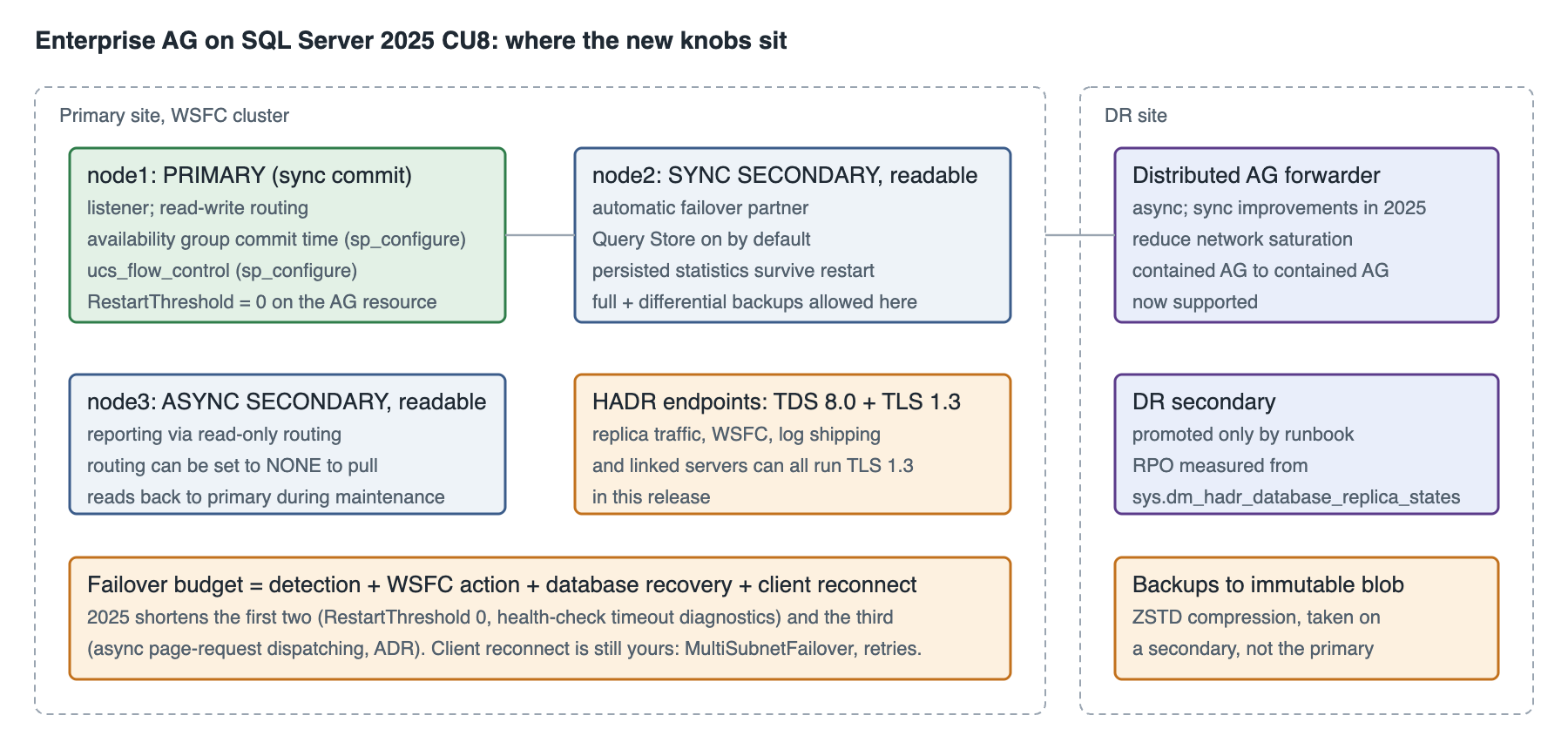
Availability group commit time is the one to test carefully, and the first thing to know is which way it works. The primary already batches commits for up to 10 milliseconds before shipping the log block to secondaries; that grouping is what keeps a busy AG from saturating the network with tiny sends. SQL Server 2025 exposes the window as an instance-level sp_configure option (default 0, meaning the built-in 10 ms), and the use case is lowering it: a latency-sensitive workload with modest transaction volume can shave up to 10 ms off synchronous commit at the cost of more, smaller sends.
On a high-volume system leave it alone; the batching is doing you a favour. Measure with HADR_SYNC_COMMIT waits per transaction before and after, at the same time of day:
-- SQL Server 2025 AG commit time: baseline first
SELECT wait_type, waiting_tasks_count, wait_time_ms,
       wait_time_ms * 1.0 / NULLIF(waiting_tasks_count, 0) AS avg_ms
FROM   sys.dm_os_wait_stats
WHERE  wait_type IN (N'HADR_SYNC_COMMIT', N'WRITELOG');

-- Then shorten the group commit window on the primary instance and re-measure
-- (advanced option; 0 = engine default of 10 ms; no restart required)
EXEC sys.sp_configure N'show advanced options', 1;  RECONFIGURE;
EXEC sys.sp_configure N'availability group commit time', 2;  RECONFIGURE;

-- Flow control between HADR endpoints, also instance-wide; the primary uses it to
-- detect a secondary falling behind. Check the option's current name and default
-- with sp_configure before scripting it: it is new in 17.x.
EXEC sys.sp_configure N'ucs_flow_control';
SQL Server 2025's fast failover for persistent health issues closes a gap that has existed since 2012. When the AG resource's health check fails, WSFC's default is to try restarting the resource in place before failing it over, which on a node with a genuine problem adds a minute or more of unavailability while a restart that cannot succeed is attempted. Setting the restart threshold to zero on the AG resource tells the cluster to fail over immediately. This is set through the cluster, and the release notes document it alongside better health-check timeout diagnostics so that you can tell a genuine hang from a synchronisation stall:
# On any WSFC node: fail over the AG resource immediately on a persistent health failure
# instead of attempting an in-place restart first (default RestartThreshold is 3 within RestartPeriod)
Get-ClusterResource -Name 'ag_ops' | Set-ClusterParameter -Name RestartThreshold -Value 0

# Verify
Get-ClusterResource -Name 'ag_ops' | Get-ClusterParameter -Name RestartThreshold, RestartPeriod, HealthCheckTimeout
SQL Server 2025 backups on secondaries are no longer restricted to copy-only. That sentence changes the design of every Enterprise AG's backup plan: the full and differential chain can now run entirely on a secondary, with the log backups wherever the backup preference sends them, and the primary's I/O is left for the workload. Set AUTOMATED_BACKUP_PREFERENCE = SECONDARY_ONLY and make sure the backup job checks sys.fn_hadr_backup_is_preferred_replica before running, as it always should have.
The remaining items are operational quality of life: a listener IP can be removed without dropping the listener, read-only and read-write routing can be set to NONE to pull traffic back to the primary during maintenance, distributed availability groups now work between two contained availability groups (which makes the contained AG, introduced in 2022, usable for DR rather than only for HA), the asynchronous commit path in distributed AGs is less prone to saturating the link, and every replication and HA channel, including WSFC, AG endpoints, FCI, log shipping and linked servers, can run TDS 8.0 over TLS 1.3.
Databases that fail to read their persisted AG configuration during a network interruption now move to RESOLVING rather than staying in an ambiguous state, which is a small change that removes a confusing manual step from more than one runbook we maintain.
On-premises versus cloud: where each feature actually runs
The same 17.x engine appears in four shapes, and the feature list is not the same in each. The table is what I hand to clients deciding where a SQL Server 2025 workload should live.
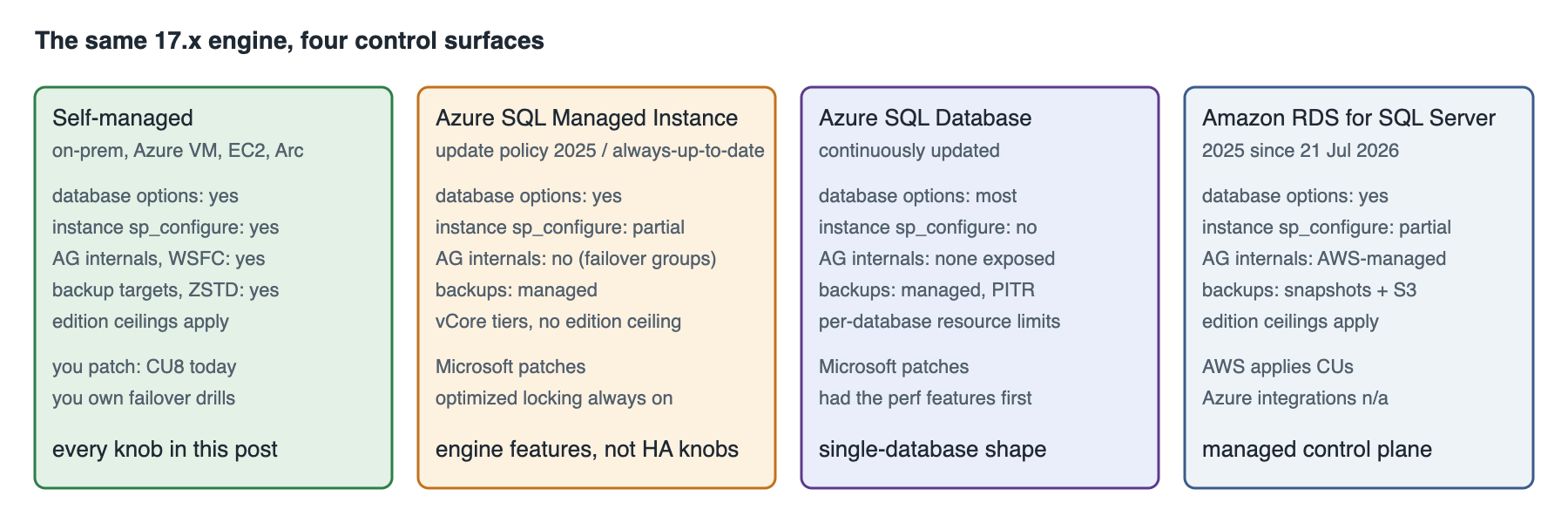
| Capability | SQL Server 2025 self-managed (on-prem, Azure VM, EC2, Arc-enabled) | Azure SQL Managed Instance | Azure SQL Database | Amazon RDS for SQL Server |
|---|---|---|---|---|
| Engine version and patching | 17.x, you apply CUs; CU8 current | Always-up-to-date policy already carried most SQL Server 2025 features before GA; SQL Server 2025 update policy pins the surface | Continuously updated; ahead of the boxed product | SQL Server 2025 supported since 21 Jul 2026 (Enterprise, Standard, Developer); CU applied on the AWS schedule |
| Optimized locking | Opt-in per database; ADR then RCSI then enable | Always on (update policy 2025 or always-up-to-date) | Always on since 2023 | Opt-in per database, same T-SQL; verify against the RDS feature list for your engine version |
| tempdb space governance | Resource Governor, Standard and Enterprise | Available; MI exposes Resource Governor | Not applicable; per-database resource limits instead | Resource Governor is available on RDS; workload-group DDL runs as the master user |
| Always On AG | Full control: commit time, flow control, restart threshold, backups on secondary, contained and distributed AGs | Managed failover groups and built-in HA; AG internals not exposed | Built-in HA, geo-replication, failover groups | Multi-AZ uses AGs (Enterprise) or DBM (Standard) managed by AWS; readable secondaries on Enterprise; AG knobs not exposed |
| Backups | ZSTD, immutable blob, full/diff on secondaries | Automated; compression and targets managed | Automated | Automated snapshots plus native backup to S3 via rds_backup_database; compression option set by RDS |
| Standard edition 32-core / 256 GB | Yes, plus Resource Governor | Not applicable (vCore tiers) | Not applicable | Yes; instance class sets the ceiling below that anyway on most classes |
| Change Event Streaming, Fabric mirroring | Preview; targets are Azure Event Hubs / Fabric; Entra auth from CU3 on Arc or Azure VM | Fabric mirroring supported | Fabric mirroring supported | Not applicable; CDC to Kinesis/MSK via DMS or Debezium instead |
| Vector search, DiskANN index | Vector type GA; vector index and VECTOR_SEARCH are preview | Vector type available | Vector type available; index status follows the service | Vector type available; treat the index as preview until AWS documents otherwise |
The pattern is the one you would expect. Self-managed SQL Server 2025 gives you every knob in this post and makes you responsible for using them. Managed Instance gives you the engine-level features (optimized locking, the query processing improvements, columnstore changes) with the HA internals taken away and replaced with failover groups; if your reason for wanting SQL Server 2025 is the AG knobs, MI is not where you get them. Azure SQL Database had most of the performance features first and has never exposed an AG at all. RDS is a self-managed engine with a managed control plane: the database-scoped features work, the instance-level and cluster-level ones are AWS's to configure, and the Azure-targeted integrations do not apply.
Where I would deploy SQL Server 2025, and where I would wait
As of September 2026, with CU8 out: for a new self-managed deployment, SQL Server 2025 on CU8 is the version, and the migration from 2019 in particular should not wait, given that 2019 has been on extended support only since February 2025. For an in-place upgrade of a stable 2022 estate, the case is strongest where the workload suffers from lock escalation or tempdb exhaustion, or where a Standard edition instance is capped at 24 cores or 128 GB; if none of those is true, 2022 is supported to 2033 and there is no urgency.
Turn on optimized locking one database at a time with the wait-stat baseline described above, put tempdb governance on every instance, and leave the preview features (vector indexes, Change Event Streaming, the fuzzy-matching functions, optimized sp_executesql) off in production until they lose the PREVIEW_FEATURES gate. In Azure, Managed Instance on the SQL Server 2025 update policy is the shape that keeps your on-premises and cloud feature surfaces aligned, which matters more than any single feature if you run both.
Test all of this against your own workload in a staging environment with production data volumes and production concurrency before it goes anywhere near production, keep a verified backup and a rehearsed restore in place before enabling any database-scoped option, and treat the LAQ semantic change as an application test item, not a database one. If you want a second pair of eyes on a SQL Server 2025 upgrade, an AG design, or a Standard-versus-Enterprise decision with the new ceilings, that is the work the MinervaDB SQL Server support team does every week, on-premises and in Azure and AWS.
References
What's new in SQL Server 2025 · SQL Server 2025 release notes · SQL Server 2025 build versions · SQL Server 2025 lifecycle · Optimized locking · tempdb space resource governance · Editions and supported features of SQL Server 2025 · SQL Server 2025 is now generally available · Amazon RDS for SQL Server now supports SQL Server 2025 · Azure SQL Managed Instance update policy