Redis 8.10 performance and reliability: the short version
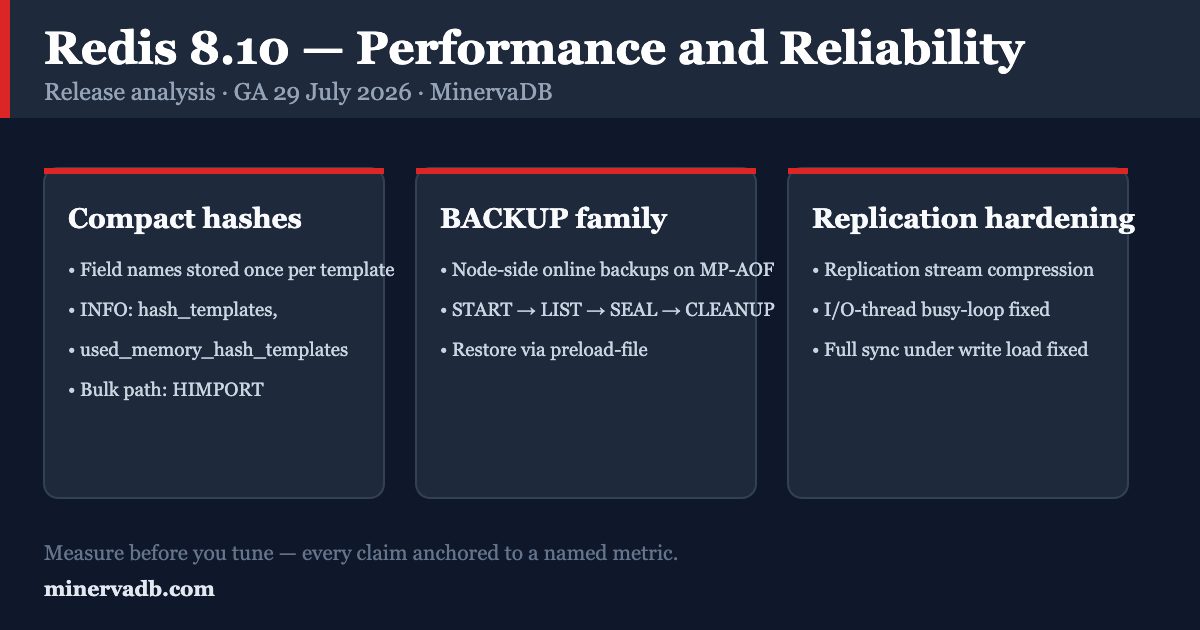
The headline for Redis 8.10 performance is that this is a memory-and-durability release wearing a performance badge. The two changes that will alter how you size and operate a Redis fleet are compact hashes, which store field names once across keys that share a schema, and the BACKUP command family, which finally gives you node-side online backups built on multi-part AOF instead of a hand-rolled BGSAVE-and-copy script. Everything else — the new list, set and stream commands, the JSONPath expansion, the search timeout controls — is genuinely useful, but it will not change your capacity plan.
This post covers the three changes that matter operationally, demonstrates each with runnable commands, states who is affected, and closes with a dated, version-pinned upgrade stance. It is written for engineers running Redis as production infrastructure, not as a changelog retelling.
Step zero: establish exactly what you are running
Before any of this applies, confirm the engine and the version. “Redis” in a real estate is frequently Redis OSS 7.2.4 under BSD, Redis 8.x under the tri-license, Valkey, or a managed service running one of them. Everything downstream — feature availability, licensing posture, upgrade path — depends on the answer.
redis-cli INFO server | grep -E 'redis_version|redis_mode|os|arch_bits|io_threads_active'
redis-cli INFO memory | grep -E 'used_memory_human|maxmemory_policy|mem_allocator'
redis-cli CONFIG GET appendonly appendfsync repl-diskless-sync save
Two facts to record alongside the version:
- Licensing. Redis Open Source 8.0.0 and later ships under a tri-license — RSALv2, SSPLv1, or AGPLv3, user’s choice — and that same tri-license covers the integral modules (RediSearch, RedisJSON, RedisTimeSeries, RedisBloom). Redis 7.2.x and earlier were BSD-3-Clause. This is an architecture input, not legal trivia; route formal compliance questions to counsel.
- Support horizon. As of August 2026, 8.10 is the current release. 8.0’s security support runs to 01 Dec 2026, and 7.2/7.4 to 01 Dec 2029. If you are on 8.0, you have a deadline.
Change 1: Compact hashes and the memory line item
What changed
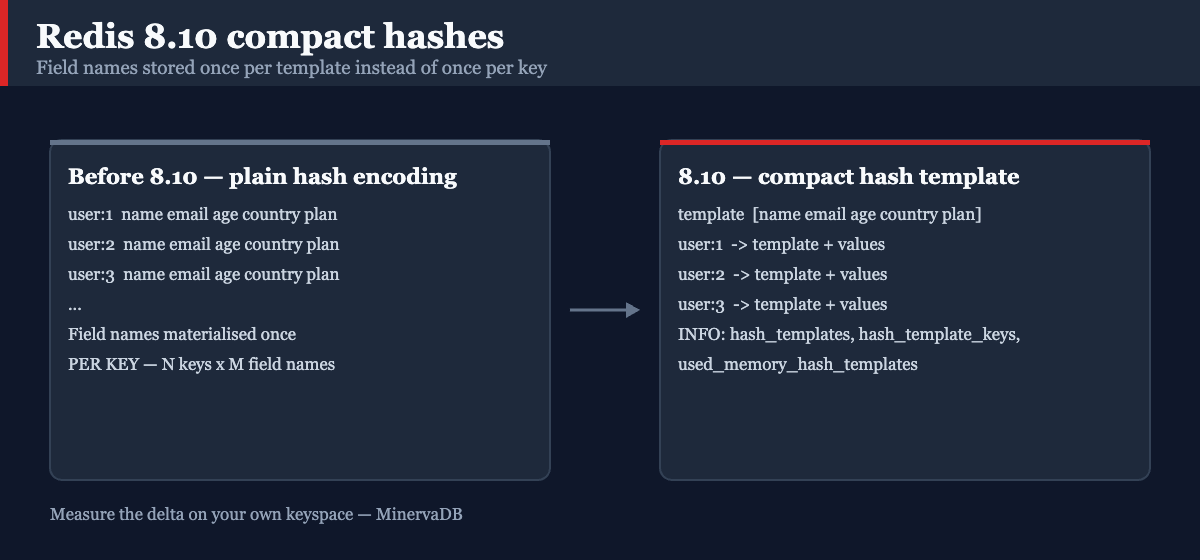
Redis 8.10 introduces a new hash encoding that stores field names once per template, shared across every key that uses the same field layout. Redis has always had two hash encodings — listpack for small hashes and hashtable for large ones — and in both, every key carried its own copy of every field name. For the single most common Redis modelling pattern in the wild (one hash per entity, identical fields across millions of entities), that repetition was pure overhead.
Consider a million user records stored as user:{id} hashes with fields name, email, age, country, plan, created_at. Before 8.10, those six field-name strings were materialised a million times each. With compact hashes, they are materialised once into a template, and each key stores only its values plus a template reference.
Measuring it
Three new counters expose the encoding directly, so you can verify the saving rather than assume it:
# Distinct templates and how many keys are backed by them
redis-cli INFO stats | grep -E 'hash_templates|hash_template_keys'

# Memory consumed by the templates themselves
redis-cli INFO memory | grep used_memory_hash_templates

# Per-key verification
redis-cli OBJECT ENCODING user:1
redis-cli MEMORY USAGE user:1
The honest way to size the benefit on your data is to load a representative slice into a scratch instance on both versions and compare used_memory. Do not extrapolate from a vendor headline:
# Reproducible A/B: same dataset, two instances, two versions.
# Run on a scratch host. Never point this at production.

for PORT in 6388 6389; do
  redis-cli -p "$PORT" FLUSHALL
done

# Generate 1M schema-identical hashes and pipe them in
python3 - <<'PY' > /tmp/users.redis
for i in range(1, 1_000_001):
    print(f"HSET user:{i} name u{i} email u{i}@example.com age {20 + i % 50} "
          f"country IN plan pro created_at 2026-08-15")
PY

redis-cli -p 6388 --pipe < /tmp/users.redis   # 8.8 instance
redis-cli -p 6389 --pipe < /tmp/users.redis   # 8.10 instance

for PORT in 6388 6389; do
  echo -n "port $PORT: "
  redis-cli -p "$PORT" INFO memory | grep -E '^used_memory:'
done
Report the delta from your own run. That number is the one your capacity plan can spend.
The bulk-load path: HIMPORT
HIMPORT (new in 8.10) is a connection-scoped session that declares field names once and then sends values only. It reduces network bytes and per-command parsing work, and it lands the keys directly in the compact encoding. The fieldset is local to the connection and is discarded when the connection closes or on RESET.
# Declare an ordered fieldset named "u" on this connection
HIMPORT PREPARE u name email age

# Send values only — field names are never repeated on the wire
HIMPORT SET user:1 u alice alice@example.com 30
HIMPORT SET user:2 u bob   bob@example.com   25

# Housekeeping
HIMPORT DISCARD u
HIMPORT DISCARDALL
This is the right tool for migrations, warm-cache rebuilds, and ETL sinks. It is not a replacement for HSET in application code.
Configuration: what to set, and when
Three startup-relevant parameters govern how plain hashes are converted to templates during RDB load. Treat the defaults as correct until measurement says otherwise.
| Parameter | Controls | Change requires |
|---|---|---|
hash-rdb-load-min-template-entries |
Minimum field count before a plain hash is converted to a template during load | CONFIG SET (verify on your build) |
hash-rdb-load-max-template-entries |
Maximum field count eligible for load-time conversion | CONFIG SET (verify on your build) |
hash-rdb-load-template-disassembly-threshold |
Minimum number of keys a converted template must end up backing to be kept | CONFIG SET (verify on your build) |
redis-cli CONFIG GET 'hash-rdb-load-*'
Who is affected, and where it does not help
It helps most when you have many keys with an identical field layout — session stores, user/product/device catalogues, feature stores, entity caches.
It helps least when hashes are heterogeneous (every key a different shape), when hashes are few and enormous, or when your memory is dominated by strings, sorted sets or streams rather than hashes. A wide-column model with per-key ad-hoc fields will produce template churn rather than template reuse — watch hash_templates climbing towards hash_template_keys, which is the signature of a schema too variable to benefit.
If your memory pressure is actually eviction policy or TTL hygiene rather than encoding, the fix is elsewhere. Our field guide on mastering Redis TTL covers the expiry-side of the same problem.
Change 2: The BACKUP command family — online backups without the shell scripts
What changed
Until 8.10, “backing up Redis” meant one of a small set of unsatisfying options: trigger BGSAVE and copy dump.rdb, copy the AOF directory and hope you caught a consistent manifest, or take a filesystem/EBS snapshot and accept the fork-timing risk. Redis 8.10 ships BACKUP, a container command that produces a self-contained, restorable artifact set reusing the multi-part AOF (MP-AOF) format, without stopping writes and without you managing rewrites by hand.
A sealed backup is three artefacts:
appendonly.aof.N.base.rdb— the BASE point-in-time snapshotappendonly.aof.N.incr.aof— the INCR file holding writes accumulated after the snapshotappendonly.aof.manifest— a standalone manifest describing the set
The workflow
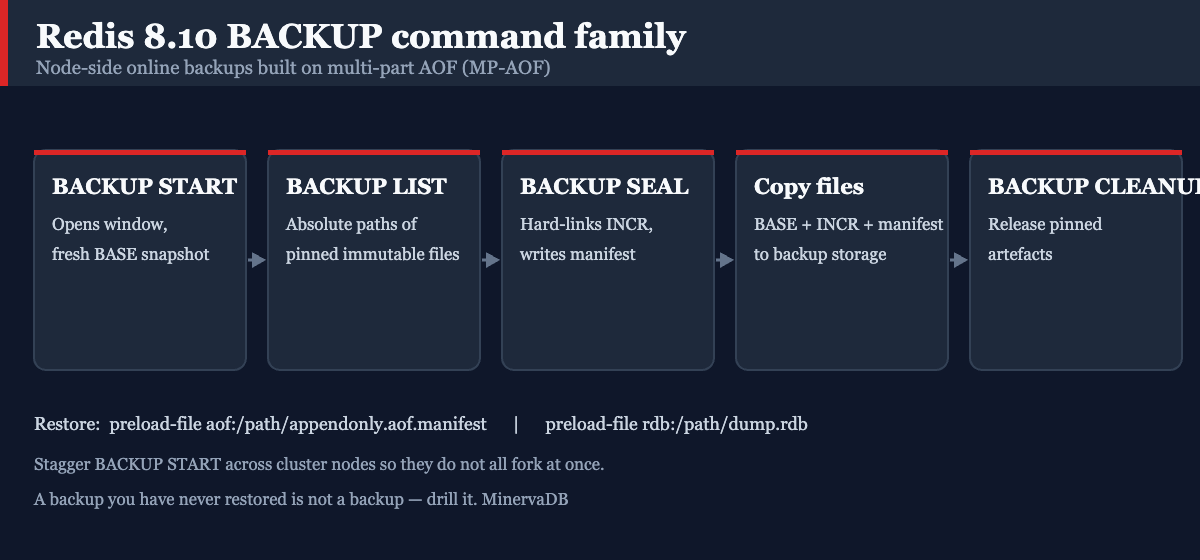
# 1. Open a backup window and produce a fresh BASE.
#    Works whether or not AOF persistence is enabled.
redis-cli BACKUP START

# 2. Ask which immutable files are pinned so far.
#    The data plane can start copying BASE while Redis keeps accumulating INCR.
redis-cli BACKUP LIST

# 3. Freeze the backup: hard-link the INCR, write the manifest.
#    After SEAL, BACKUP LIST also returns the INCR and manifest paths.
redis-cli BACKUP SEAL

# 4. Copy every path reported by BACKUP LIST to your backup target.
#    (rsync/aws s3 cp/azcopy — your data plane, not Redis's job.)

# 5. Release the pinned artefacts once the copy is verified.
redis-cli BACKUP CLEANUP
Two commands for observability at any point in that sequence:
redis-cli BACKUP STATUS   # inspect current backup state
redis-cli BACKUP ABORT    # cancel a backup that has not yet been sealed
Relevant settings:
| Parameter | Default | Meaning | Reload vs restart |
|---|---|---|---|
backupdirname |
backupdir |
Backup directory, resolved under the server’s dir |
Startup-only |
backup-sealed-ttl |
0 (disabled) |
Seconds before sealed files are auto-cleaned | Runtime |
Restore
Restore is a startup-only setting, preload-file, in the form <type>:<path>:
# Restore from a sealed MP-AOF backup
preload-file aof:/var/backups/redis/appendonly.aof.manifest

# Or from a single RDB
preload-file rdb:/var/backups/redis/dump-2026-08-15.rdb
When preload-file is set, Redis loads only that file or manifest and skips its normal appenddirname and dump.rdb loading. Once preload completes, it resumes the persistence mode you configured.
Why this matters operationally
The genuinely important design detail is that creation is decoupled from finalisation. BACKUP START and BACKUP SEAL are separate calls, so a control plane can stagger START across cluster nodes and avoid every node forking at the same instant — the classic cause of a synchronised RSS spike and a latency cliff across a whole shard group. Each node produces its BASE independently; consistency is established at the seal boundary.
Production safety caveat. A backup you have never restored is not a backup. Before this replaces your existing procedure, run a full restore into an isolated instance, validate key counts and a sample of application-level invariants, and time the restore so you have a real RTO number. Test in staging first; keep your existing backup path running in parallel for at least one full retention cycle.
A backup path is only half of a DR posture. Our Redis performance audit methodology treats restore drills as a first-class deliverable, not an afterthought.
Change 3: Replication and full-sync hardening
The replication path has been getting steady attention across the 8.x line, and 8.10 continues it. Three items are worth your attention.
Replication stream compression. Redis 8.10 adds compression of the replication stream between primaries and replicas, aimed squarely at bandwidth consumption. This matters most for cross-AZ and cross-region topologies, where replication egress is a line item on the cloud bill, and for write-heavy primaries where the output buffer is the constraint. One caveat shipped alongside it: a fix for memory reported for compressed replication clients being lower than actual consumption — evidence that this is a young code path. Watch client_output_buffer behaviour after upgrading.
I/O thread busy-looping for replica clients is fixed. If you run with io-threads enabled and have replicas attached, this was burning CPU for nothing.
Full sync under heavy write load is fixed. Full syncs that coincide with a write burst are exactly the condition under which a replica fails to catch up and re-triggers another full sync — the resync loop that turns a routine replica restart into an incident.
That builds on 8.8, where Redis eliminated RDB checksum computation on diskless transfers on the grounds that the replication link already provides integrity. Redis published a 12 GB full sync on a c8g.2xlarge dropping from 35 seconds to 11 seconds — a 68% reduction — as a result. Redis also reported pipelined SET/HSET/ZADD with an attached replica running 3% to 26% faster after reworking per-write bookkeeping in the replication feed path.
Verify the effect on your own topology rather than trusting the number:
# Full-sync counters: sync_full should stay flat in steady state.
redis-cli INFO stats | grep -E 'sync_full|sync_partial_ok|sync_partial_err'

# Replica-side lag and link health
redis-cli INFO replication

# Backlog sizing — the single most common cause of avoidable full syncs
redis-cli CONFIG GET repl-backlog-size repl-backlog-ttl
redis-cli CONFIG GET client-output-buffer-limit
If sync_partial_err is non-zero and sync_full is climbing, your backlog is too small for your write rate and no amount of release upgrading will fix it.
Redis 8.10 performance in context: the 8.4 → 8.10 curve
Redis 8.10 performance work does not stand alone: the 8.x line has been shipping measurable command-level gains every quarter. The figures below are Redis’s own published measurements, not MinervaDB benchmarks. We reproduce them here with their methodology attached because a number without methodology is marketing.
Redis 8.8 vs 8.6 — tested on AWS m7i.metal-24xl (x86) and m8g (ARM Graviton4), identical builds, official OSS spec, multiple runs:
| Operation | Reported gain | Mechanism |
|---|---|---|
MGET (pipelined, I/O threads) |
up to 68% | Batched dict-bucket prefetch |
MGET (pipelined, single thread) |
up to 50% | Memory prefetch framework |
HGETALL (1,000-field hashtable hashes) |
up to 25% | Cross-command + dict-bucket prefetch |
XREADGROUP (COUNT 100) |
up to 83% | Radix-tree O(1) append path, last-child-first descent |
ZADD / ZINCRBY / ZRANGEBYSCORE |
up to 74% | Widened Clinger fast path in float parsing |
SCAN family (COUNT 500, pipeline 10) |
+38.0% x86, +39.7% ARM | Stack-allocated reply vector, zero heap allocations |
| Diskless full sync (12 GB) | 35s → 11s | RDB checksum elimination on diskless transfer |
Redis 8.6 vs 8.4 — single core, m8g.24xlarge (Graviton4):
| Metric | Reported change |
|---|---|
| Sorted-set command latency | up to 35% lower |
GET on short strings |
up to 15% lower |
| List command latency | up to 11% lower |
| Hash command latency | up to 7% lower |
| Hash memory footprint | up to 16.7% smaller |
| Sorted-set memory footprint | up to 30.5% smaller |
VADD insertion / query |
up to 43% / 58% faster (binary and 8-bit quantisation, x86-64) |
Redis also reported 3.5M ops/sec on a single node at pipeline depth 16 with 11 I/O threads on m8g.24xlarge, and framed the 8.6 line as 5×+ the caching throughput of Redis 7.2.
How to read these numbers. Treat them as a ceiling on Redis 8.10 performance, not a forecast. They are single-command microbenchmarks at high pipeline depth on large instances. Real application workloads are dominated by round-trip time, key distribution, value size, and the presence of one pathological command in the mix. The 8.x gains are real and they are free on upgrade — but if your p99 is 8 ms because a KEYS call runs every 30 seconds, no release will help you. That class of problem is what our Redis performance troubleshooting field guide exists to localise, and the eBPF-based tracing approach is how we get per-operation visibility when SLOWLOG is not enough.
Redis 8.10 reliability fixes that are upgrade drivers on their own
Read these as security and correctness debt you are carrying if you stay put. Redis 8.10 fixes, among 30+ core items:
- ACL permission bypass in
SORT,GEORADIUS,GEORADIUSBYMEMBER,XREADandXREADGROUP. If you rely on ACLs for multi-tenant isolation, this is a confidentiality issue, not a nuisance. - Error-reply manipulation via injected
\r\nsequences — a protocol-level response-splitting class of bug. - AOF load failure when the AOF file had an RDB preamble and active defragmentation was enabled. This is a restore-time failure: the worst possible time to discover it.
- Division-by-zero when active-defragmentation thresholds are misconfigured.
- Clients left permanently blocked on
BLPOP,BLMOVEorBLMOVEMafter aSORT ... STOREreplaced the target key. MEMORY USAGEover-reporting, duplicate KeyMeta restoration during AOF rewrite, and RDB load robustness fixes for streams.
Redis 8.8 separately addressed five CVEs (CVE-2026-23479, CVE-2026-25243, CVE-2026-23631, CVE-2026-25588, CVE-2026-25589) covering use-after-free and invalid-memory-access classes. If you are on 8.6 or earlier, you are exposed to all of them.
Verify your ACL surface after upgrading:
redis-cli ACL LIST
redis-cli ACL GETUSER <username>
redis-cli ACL CAT keyspace
Bounded replies: the quietest Redis 8.10 reliability win
Unbounded replies are one of the more common ways a healthy Redis instance takes an application down — a consumer asks for “everything since last offset” after an outage and receives a multi-gigabyte reply that blows the client output buffer. Redis 8.10 adds explicit caps:
# Cap cumulative entries AND cumulative reply size on stream reads
XREAD MAXCOUNT 5000 MAXSIZE 8388608 STREAMS events $
XREADGROUP GROUP g1 c1 MAXCOUNT 1000 MAXSIZE 1048576 STREAMS events >
Set these in your consumers now. They are the cheapest reliability change in the release.
Related controls in the same theme:
SUNIONCARDandSDIFFCARDreturn set-operation cardinalities without materialising the result set — the answer to “how many, roughly” that used to cost a fullSUNIONSTORE.slowlog-entry-max-argcandslowlog-entry-max-string-len(8.8) cap what a slowlog entry retains, so a pathological command no longer bloats the slowlog itself.- Redis Search gains a third
search-on-timeoutmode,RETURN_STRICT, alongsideFAILand the defaultRETURN— partial results with a strict post-processing timeout, for query paths where an unbounded tail is worse than an incomplete answer.
What Redis 8.10 does not change
Honest edges matter more than feature lists, and three limits bound every Redis 8.10 performance claim above:
- Command execution is still effectively single-threaded. I/O threads parallelise socket work, not command execution. One
O(N)command on a large collection still stalls every other client. Data-structure and key-design discipline is unchanged — see our notes on optimizing Redis for mixed read/write workloads. - Durability is still a configuration decision, not a default.
appendfsync everysecstill means you can lose roughly a second of writes. Redis’s own guidance remains: run AOF and RDB if you want data-safety comparable to a relational engine.BACKUPis a backup mechanism, not a durability upgrade. - Cluster semantics are unchanged. Cross-slot operations, resharding mechanics and hash-tag design are what they were.
- Compact hashes are an encoding, not a schema. Redis is still schemaless; the template is an internal optimisation you should measure, not a contract you can rely on.
Redis 8.10 vs Valkey 9.1: how to read the fork
Both engines are shipping serious performance work, and both publish numbers on their own hardware with their own methodology. Valkey 9.1 (19 May 2026) reported 2.1M requests/sec on a single server with 512-byte payloads, 9 I/O threads and pipeline depth 10, a new I/O threading model worth up to 17% across workloads, XRANGE/XREVRANGE up to 30% faster, string memory down up to 20% for values under 128 bytes, and TLS certificate hot-reload for rotation without downtime.
These figures are not comparable to Redis’s. Different instance types, different payload sizes, different pipeline depths, different workload mixes. Anyone presenting a Redis-vs-Valkey throughput ratio derived from the two vendors’ blog posts is doing arithmetic on incompatible inputs.
What is comparable is the decision frame:
- License. Valkey is BSD-3-Clause. Redis 8.x is tri-licensed (RSALv2 / SSPLv1 / AGPLv3). For some enterprises this decides the question before any benchmark runs.
- Feature surface. Redis 8.x ships Search, JSON, TimeSeries and Bloom as integral, same-versioned modules. Valkey addresses this through separate BSD modules (
valkey-search,valkey-json,valkey-bloom). If you use in-engine search or vectors, this is the axis that matters. - Portability. Nothing after 7.2.4 should be assumed portable between the two. Verify per feature, per engine, per version. Compact hashes,
HIMPORTand theBACKUPfamily are Redis-only as of this writing. - Managed-service reality. Your cloud provider’s roadmap may decide this for you regardless of what you prefer.
We consult on both and recommend against either when it is the wrong fit. Where vector search is the actual requirement at serious scale, compare honestly against pgvector and Milvus before committing to in-engine vectors at all.
Our upgrade stance (dated: 15 August 2026)
If you are on Redis 8.8: upgrade to 8.10 within your normal patch cadence. The ACL bypass fixes and the AOF-with-defrag load failure are the drivers; compact hashes are the bonus. Low risk — 8.8 to 8.10 is an incremental step on the same line.
If you are on Redis 8.6 or 8.4: upgrade with priority. You are carrying five unpatched CVEs from the 8.8 cycle plus the 8.10 ACL fixes, and you are missing the entire 8.8 prefetch and replication-feed performance work.
If you are on Redis 8.0: plan now. Security support ends 01 Dec 2026. Treat this as a scheduled project with a restore drill, not a rolling patch.
If you are on Redis 7.2 or 7.4: the upgrade is a licensing decision as much as a technical one, because it moves you from BSD-3-Clause to the tri-license. Make that call deliberately, with counsel involved, and evaluate Valkey in the same exercise rather than defaulting.
Wait, if: you depend on a module or client library that has not certified against 8.10; you run a managed service where the version is not yours to choose; or you cannot schedule a restore drill against the new BACKUP path within the change window. In the last case, upgrade anyway but do not cut over your backup procedure until the drill is done.
Upgrade checklist
# --- BEFORE ---
# 1. Capture the baseline. You cannot claim an improvement without one.
redis-cli INFO all > /tmp/pre-upgrade-info.txt
redis-cli CONFIG GET '*'  > /tmp/pre-upgrade-config.txt
redis-cli --latency-history -i 5   # run for one full traffic cycle

# 2. Verify a restore works on the CURRENT version before changing anything.
#    Restore into an isolated instance. Never into production.

# 3. Confirm replica health and backlog sizing.
redis-cli INFO replication
redis-cli INFO stats | grep -E 'sync_full|sync_partial_err'

# --- AFTER (per node, replicas first, then failover, then old primary) ---
redis-cli INFO server   | grep redis_version
redis-cli INFO stats    | grep -E 'hash_templates|hash_template_keys'
redis-cli INFO memory   | grep -E 'used_memory:|used_memory_hash_templates'
redis-cli INFO stats    | grep -E 'sync_full|sync_partial_err'
redis-cli ACL LIST

# 4. Compare against the baseline. Then, and only then, exercise BACKUP.
redis-cli BACKUP START && redis-cli BACKUP STATUS
Every step above is read-only or additive. Nothing here drops, truncates or flushes anything — and if you adapt these commands, keep it that way. The FLUSHALL in the compact-hash benchmark earlier is scoped to a scratch host on purpose; it has no business anywhere near a production endpoint.
Frequently asked questions
Does upgrading alone improve Redis 8.10 performance? Partly. Command-level gains from the 8.6 and 8.8 cycles are free on upgrade, and compact hashes reduce memory without application changes. But if your latency comes from an O(N) command, an oversized value, or an undersized replication backlog, no release fixes it — measure first.
Is Redis 8.10 backward compatible with 8.8? Yes for the covered surface. The new commands (HIMPORT, BACKUP, LMOVEM, BLMOVEM, SUNIONCARD, SDIFFCARD) are additive, and compact hashes are an internal encoding change — application code does not change. Validate your client library’s support for the new commands before you use them.
Do compact hashes require me to change my application? No. The encoding is chosen internally. HIMPORT is an optional bulk-load path, useful for migrations and ETL sinks, not a replacement for HSET.
Does the BACKUP command replace RDB and AOF? No. BACKUP produces a restorable artefact set from the MP-AOF format; it does not change your durability configuration. appendfsync and save still govern what you can lose.
How much memory will compact hashes actually save me? It depends entirely on how many of your keys share a field layout. Measure it with the A/B procedure above on your own dataset. Anyone quoting you a percentage without seeing your keyspace is guessing.
Is Redis 8.10 open source? Redis Open Source 8.x is tri-licensed: RSALv2, SSPLv1, or AGPLv3 at the user’s choice. AGPLv3 is OSI-approved; the other two are source-available. We are not lawyers — take licence-compliance questions to counsel.
Should I move to Valkey instead? It depends on your licence constraints, your dependence on in-engine Search/JSON/TimeSeries, and your managed-service provider’s roadmap. Both are credible. Decide on those three axes, not on vendor throughput headlines.
Working with MinervaDB
MinervaDB provides vendor-neutral Redis support and consulting — 24×7 consultative support, remote DBA, performance engineering and HA/DR architecture — as part of our full-stack enterprise database practice across PostgreSQL, MySQL, MariaDB, SQL Server, MongoDB, ClickHouse, Cassandra, Redis, Valkey and cloud DBaaS. If you want Redis 8.10 performance and reliability validated on your own estate — the compact-hash saving measured on your keyspace and the BACKUP path validated with a real restore drill before you trust it, that is a scoped engagement we run regularly.
Further reading from our library: the Redis troubleshooting cheatsheet and the advanced Redis operations cheatsheet.
Standing caveat: every configuration change and command in this post must be tested in a non-production environment before it reaches production, and no upgrade should proceed without a verified, drilled DR posture.
Sources
- Redis 8.10 — What’s new
- Redis Open Source 8.10 release notes (00-RELEASENOTES)
- Redis 8.10.0 release on GitHub
- HIMPORT command reference
- BACKUP command reference
- Redis persistence — online backups with the BACKUP command family
- Redis 8.8 performance improvements
- Redis 8.8 — What’s new
- Announcing Redis 8.6: performance improvements and streams enhancements
- Redis 8.6 — What’s new
- Redis licences (RSALv2 / SSPLv1 / AGPLv3)
- Redis release and end-of-life dates
- Valkey 9.1 release announcement
Running Redis or Valkey in production? MinervaDB provides 24×7 Redis support and consulting as part of its database consulting services.
Running this in production?
MinervaDB provides Redis Support and NoSQL Database Support with 24x7 coverage and a 15-minute S1 response. Talk to an engineer.